

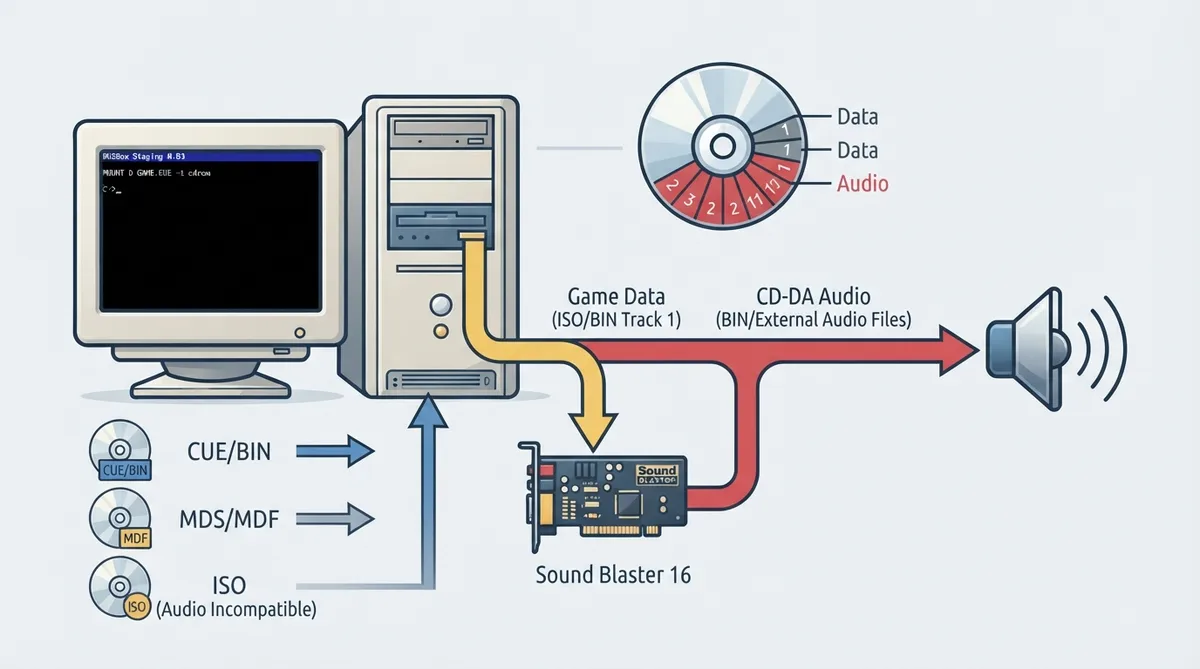
Many DOS games from the mid-1990s onward used CD-DA (Red Book audio) tracks for music. These are standard audio tracks on a CD-ROM that bypass the sound card entirely and deliver pre-recorded music directly from the game disc. DOSBox Staging 0.83 supports CD-DA playback from disc images whose audio tracks are stored in various formats.
How CD-DA playback works
CD-DA playback requires no special configuration. Mount a disc image with audio tracks using the MOUNT command, and the game will handle playback automatically. Because these tracks bypass the sound card, CD-DA does not depend on the emulated sound card configuration in the same way synthesizer music does.
Setup steps
- Prepare a disc image that contains the audio tracks (see the format notes below).
- Mount that image inside DOSBox Staging using the MOUNT command, following the mounting CD-ROM images documentation for your version.
- Launch the game. It will handle CD-DA playback automatically; no separate CD-DA setting needs to be changed.
Supported disc image formats
- CUE/BIN — a CUE sheet with binary data files; the most common format for disc images with audio tracks. Audio tracks can be stored as raw PCM in the BIN file or as separate compressed audio files.
- MDS/MDF — the Alcohol 120% disc image format.
- ISO — standard ISO 9660 images. ISO images only contain data tracks and cannot contain audio tracks; use CUE/BIN for discs with audio.
Supported audio track formats
- FLAC — Free Lossless Audio Codec, noted as recommended for lossless compression.
- Opus — modern lossy codec with high quality at low bitrates.
- Ogg Vorbis — widely used lossy codec.
- MP3 — MPEG-1 Layer 3.
- WAV — uncompressed PCM audio.
Reference table · Scroll horizontally to see all columns.
| Item | Documented detail |
|---|---|
| Configuration needed for CD-DA | None; games handle playback automatically |
| Mount command | MOUNT, using a disc image with audio tracks |
| Image formats | CUE/BIN, MDS/MDF, ISO (data only) |
| Audio track formats | FLAC, Opus, Ogg Vorbis, MP3, WAV |
| ISO limitation | ISO images cannot contain audio tracks |
Sources & references
Content responsibility: FrameTinker editorial desk. Source authors and software maintainers are credited separately below; this is not a claim of hands-on testing.
Published .
DOSBox Staging: cd da — official gaming software documentation https://raw.githubusercontent.com/dosbox-staging/dosbox-staging/main/website/docs/0.83/manual/sound/sound-devices/cd-da.mdRetrieved Nov 1, 2026Something doesn’t match your setup?
Suggest a correction