

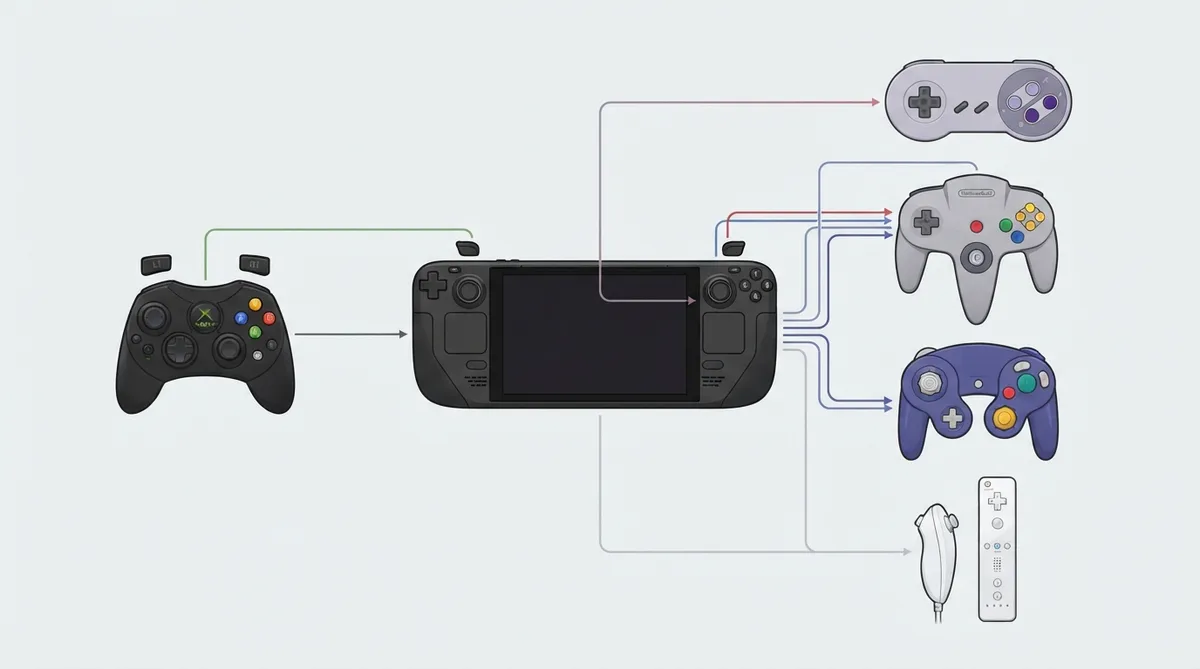
EmuDeck's official Controls 101 documentation is a reference for matching Steam Deck buttons to the button layouts of original console controllers. The page covers a Steam Deck button layout section under Configuration and then provides per-console mapping tables for Microsoft and Nintendo hardware. This article summarizes the mappings that are present in the official source.
What the document covers
The table of contents lists a Configuration section with a Steam Deck Button Layout subsection, followed by a Controls 101 section split into Microsoft Controllers (with an OG Xbox subsection) and Nintendo Controllers (including SNES, Nintendo 64, GameCube and later entries). The mapping tables below reflect the rows shown in the official documentation.
OG Xbox mapping
For OG Xbox, the D-pad directions match one-to-one, and the Steam Deck A, B, X and Y buttons map to the correspondingly labeled Xbox face buttons. The remaining rows shown in the source assign L1 to the White button and R1 to the Black button.
SNES mapping
For SNES, the D-pad directions match one-to-one, but the face buttons are cross-mapped: Steam Deck A maps to SNES B, Steam Deck B maps to SNES A, Steam Deck X maps to SNES Y, and Steam Deck Y maps to SNES X. L1 maps to the SNES L button and R1 maps to the SNES R button.
Nintendo 64 mapping
For Nintendo 64, the D-pad directions match one-to-one. Steam Deck A maps to B and Steam Deck B maps to A on the N64 layout. The source also lists L and R assignments alongside L1 mapped to Z and R1 mapped to a C Buttons mode, with L2 mapped to L and R2 mapped to R. A combined R1 plus Y entry also appears in the source excerpt.
GameCube mapping
For GameCube, the D-pad directions match one-to-one. Steam Deck A maps to GameCube A, while Steam Deck X maps to B, Steam Deck B maps to X, and Steam Deck Y maps to Y. R1 maps to Z, L2 maps to L and R2 maps to R. The source also maps the left stick to the GameCube Control Stick.
Wii mapping
For Wii, the D-pad directions match one-to-one, and Steam Deck A and B map to Wii A and B. Steam Deck X maps to the Wii 1 button and Steam Deck Y maps to the Wii 2 button. Select maps to minus and Start maps to plus on the Wii Remote layout. R1 maps to the Nunchuk C button and R2 maps to the Nunchuk Z button.
The official page frames these tables as a way to match Steam Deck buttons to the original controllers. Use the per-console sections above as a reference when comparing an emulator's default button layout on the Steam Deck to the original hardware.
Reference table · Scroll horizontally to see all columns.
| Steam Deck | OG Xbox |
|---|---|
| DPAD Up | DPAD Up |
| DPAD Down | DPAD Down |
| DPAD Left | DPAD Left |
| DPAD Right | DPAD Right |
| A | A |
| B | B |
| X | X |
| Y | Y |
| L1 | White Button |
| R1 | Black Button |
Reference table · Scroll horizontally to see all columns.
| Steam Deck | SNES |
|---|---|
| DPAD Up | DPAD Up |
| DPAD Down | DPAD Down |
| DPAD Left | DPAD Left |
| DPAD Right | DPAD Right |
| A | B |
| B | A |
| X | Y |
| Y | X |
| L1 | L |
| R1 | R |
Reference table · Scroll horizontally to see all columns.
| Steam Deck | Nintendo 64 |
|---|---|
| DPAD Up | DPAD Up |
| DPAD Down | DPAD Down |
| DPAD Left | DPAD Left |
| DPAD Right | DPAD Right |
| A | B |
| B | A |
| L | L |
| R | R |
| L1 | Z |
| R1 | C Buttons Mode |
| L2 | L |
| R2 | R |
| R1 + Y | (combined entry in source) |
Reference table · Scroll horizontally to see all columns.
| Steam Deck | GameCube |
|---|---|
| DPAD Up | DPAD Up |
| DPAD Down | DPAD Down |
| DPAD Left | DPAD Left |
| DPAD Right | DPAD Right |
| A | A |
| X | B |
| B | X |
| Y | Y |
| R1 | Z |
| L2 | L |
| R2 | R |
| Left Stick | Control Stick |
Reference table · Scroll horizontally to see all columns.
| Steam Deck | Wii |
|---|---|
| DPAD Up | DPAD Up |
| DPAD Down | DPAD Down |
| DPAD Left | DPAD Left |
| DPAD Right | DPAD Right |
| A | A |
| B | B |
| X | 1 |
| Y | 2 |
| Select | - |
| Start | + |
| R1 | Nunchuk C |
| R2 | Nunchuk Z |
Sources & references
Content responsibility: FrameTinker editorial desk. Source authors and software maintainers are credited separately below; this is not a claim of hands-on testing.
Published .
EmuDeck: controls and hotkeys — steamos — controls 101 — official gaming software documentation https://raw.githubusercontent.com/EmuDeck/emudeck.github.io/main/docs/controls-and-hotkeys/steamos/controls-101.mdRetrieved Oct 30, 2026Something doesn’t match your setup?
Suggest a correction