

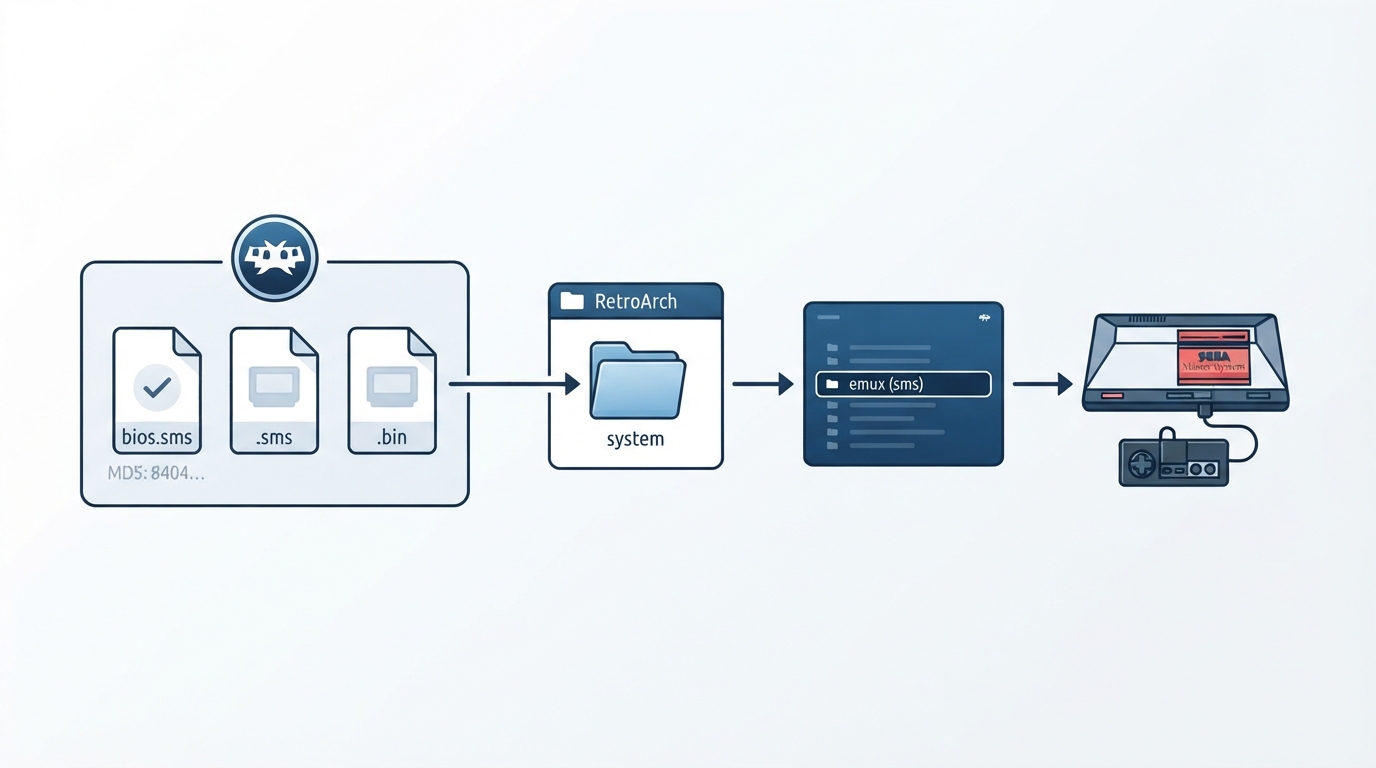
What the Emux SMS core is
Emux is a cross-platform emulator project whose goal is emulating multiple kinds of gaming-related machines, such as consoles or arcades. Its design philosophy is inspired by the Linux kernel: it keeps a code base of CPUs and controllers separate from machines, similar to how the Linux kernel supports multiple machines with platform-independent drivers. The Emux SMS core targets the Sega Master System. The core was authored by Sebastien Ronsse and is licensed under GPLv2.
Prerequisites
- Before loading content with the Emux SMS core, make sure the following are in place:
- - A RetroArch frontend installation, since the core runs inside RetroArch.
- - The Master System BIOS file, which is required for this core.
- - Compatible content files with the extensions the core accepts.
- - The associated RetroArch database (Sega - Master System - Mark III) if you use database-based features.
Placing the required BIOS file
- The Master System BIOS is listed as required for this core.
- 1. Obtain a Master System BIOS file named bios.sms.
- 2. Place the file in the RetroArch frontend's system directory.
- 3. Confirm the file matches the documented MD5 checksum: 840481177270d5642a14ca71ee72844c.
Loading content in RetroArch
- 1. Start RetroArch.
- 2. Load content that uses one of the file extensions the Emux SMS core accepts: .sms, .bin, or .rom.
- 3. Select the Emux SMS core when RetroArch asks which core to use, or set it as the associated core for these extensions.
- 4. The core's internal core name is "emux (sms)", which is how it appears when selecting a core.
Feature support at a glance
The Emux SMS core respects only a limited set of frontend-level settings. Restart, screenshots, and controls are supported. Saves, save states, rewind, netplay, core options, memory monitoring for achievements, RetroArch cheats, native cheats, remapping, multi-mouse, rumble, sensors, camera, location, subsystem, softpatching, disk control, username, language, crop overscan, and LEDs are not supported. Because saves and states are unsupported, plan for sessions you do not need to resume from a save.
Configuring controllers
- In the controls menu, the Emux SMS core supports the following device types for the first player. RetroPad is the bolded default.
- 1. Keep the device type set to RetroPad - Joypad.
- 2. Leave it on RetroPad; the documentation notes there is no reason to switch to RetroPad w/Analog.
- 3. Map the default buttons if desired using the documented defaults below.
Notes on limitations and recovery
Because the core does not support save states, saves, rewind, or remapping, the main recovery option during a session is a frontend restart, which the core does support. If content fails to load, verify that the file uses one of the accepted extensions and that the required bios.sms file is present in the system directory with the documented checksum.
Documentation references
The official documentation links to the Emux SMS core's GitHub repositories, the libretro core info file, and an issue tracker for reporting core problems. It also cross-references the Genesis Plus GX and PicoDrive cores, which cover broader Sega Master System, Game Gear, Mega Drive, and related hardware.
Reference table · Scroll horizontally to see all columns.
| Filename | Description | MD5 checksum |
|---|---|---|
| bios.sms | Master System BIOS - Required | 840481177270d5642a14ca71ee72844c |
Reference table · Scroll horizontally to see all columns.
| Item | Value |
|---|---|
| Accepted content extensions | .sms, .bin, .rom |
| Internal core name | emux (sms) |
| Core author | Sebastien Ronsse |
| License | GPLv2 |
| Associated RetroArch database | Sega - Master System - Mark III |
Reference table · Scroll horizontally to see all columns.
| Feature | Supported |
|---|---|
| Restart | Yes |
| Screenshots | Yes |
| Controls | Yes |
| Saves | No |
| Save states | No |
| Rewind | No |
| Netplay | No |
| Core options | No |
| Memory monitoring (achievements) | No |
| RetroArch cheats | No |
| Native cheats | No |
| Remapping | No |
| Multi-mouse | No |
| Rumble | No |
| Sensors | No |
| Camera | No |
| Location | No |
| Subsystem | No |
| Softpatching | No |
| Disk control | No |
| Username | No |
| Language | No |
| Crop overscan | No |
| LEDs | No |
Reference table · Scroll horizontally to see all columns.
| RetroPad input | Emux SMS core input |
|---|---|
| B | 1 |
| Start | Pause |
| D-pad up | D-pad up |
| D-pad down | D-pad down |
| D-pad left | D-pad left |
| D-pad right | D-pad right |
| A | 2 |
Sources & references
Content responsibility: FrameTinker editorial desk. Source authors and software maintainers are credited separately below; this is not a claim of hands-on testing.
Published .
RetroArch: emux sms — official gaming software documentation https://raw.githubusercontent.com/libretro/docs/master/docs/library/emux_sms.mdRetrieved Oct 12, 2026Something doesn’t match your setup?
Suggest a correction