

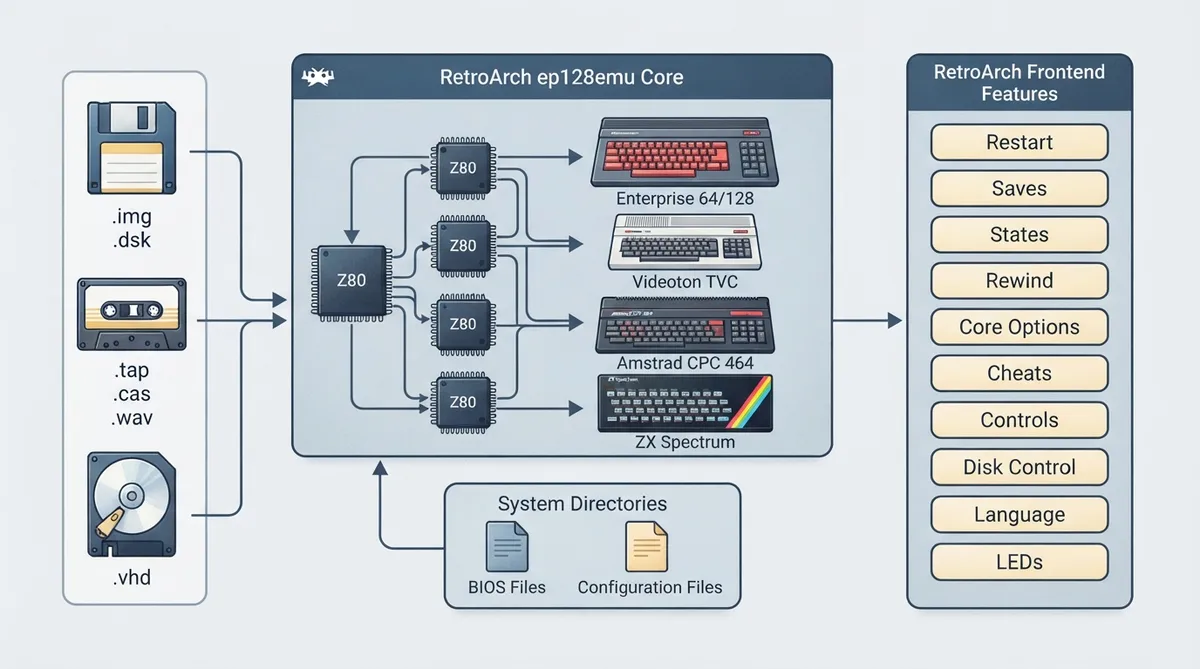
The ep128emu libretro core brings the Z80-based home computers supported by the original ep128emu project into RetroArch: Enterprise 64/128, Videoton TVC, Amstrad CPC and ZX Spectrum, with the documentation focusing on Enterprise and TVC. This article is a source summary of the official core documentation page and has not been hands-on tested.
Background and scope
Requirements
Because the emulated machines are 8-bit platforms from the 1980s, the documentation states that modern setups should have no problem emulating them. The documentation notes testing on a Raspberry Pi 2.
Supported content extensions
- .img — Enterprise, CPC or TVC floppy (or hard) disk image
- .dsk — Enterprise, CPC or TVC floppy disk image
- .vhd — Enterprise hard disk image
- .tap — Enterprise or ZX Spectrum tape image
- .dtf — Enterprise compressed file
- .cas — Videoton TVC file format
- .wav — sound file interpreted as Enterprise tape
- .tvcwav — sound file interpreted as Videoton TVC tape
- .cdt — Amstrad CPC tape image
- .tzx — ZX Spectrum tape image
- .bas, .com, .trn, .128 and no extension — common Enterprise executable extensions
From core version 1.1.0, the core can handle mono PCM WAV files with 1 to 8 bit depth as tape recordings. If libsndfile support is enabled at compile time, a wider range of formats is recognized, including MP3 when the libsndfile version is at least 1.1. By default the .wav extension triggers the built-in RetroArch media player; this can be disabled under Settings / File Browser / Use Built-in Media Player. Rename .wav files to the .tvcwav extension to have them interpreted as TVC tapes.
Feature support
The documentation lists which frontend-level features the core respects: restart, saves, states, rewind, core options, RetroArch cheats, controls, disk control, language and LEDs are supported, while netplay, remapping, memory monitoring, native cheats, multi-mouse, rumble, sensors, camera, location, subsystem, username, crop overscan and softpatching are not supported.
Directories
BIOS files are loaded from the frontend's system directory under ep128emu/rom/*, and system-wide emulation configuration files live under ep128emu/config/*.
Geometry and timing
The core reports 50 FPS and a 44.1 kHz sample rate, with a base width of 768 and base height of 288. Maximum height is 576 in interlace mode, where the reported aspect ratio is 4:3. The intelligent zoom function can reduce the apparent width and height, and the aspect ratio is adjusted accordingly. If an LED driver is configured in RetroArch, the second LED should reflect disk activity.
Loading content
- Load any supported content file; the content type is autodetected and started if possible.
- A content-specific configuration file is also loaded if present.
- Without content, the core starts with the Enterprise 128 disk configuration.
- For multi-disk or multi-tape games, use the Disk Control menu to add subsequent images and switch between them.
- RetroArch's built-in memory analyzer can be used to set up cheats.
Beyond disk, tape and file I/O differences, the core adjusts the emulated machine configuration in some cases: a .DTF content file uses the ZozoTools BIOS; a content file name containing [req brd-rom] uses the German BIOS; a name containing [req zrom] uses the Hungarian language BIOS and EPDOS; an EP128_DISK_ISDOS or EP64_DISK_ISDOS type supplied through the configuration file uses IS-DOS, the CP/M flavor for Enterprise; and a FAT12 hard disk image with the fixed disk indicator F8, or a .vhd hard disk image, uses an updated EXOS and extra ROM image.
Core options
- Main thread wait (ms) — 0 (default) | 1 | 5 | 10; forced sleep in the main thread for lower CPU use.
- High sound quality — 1 (default) | 0; disable in case of performance problems.
- Use accelerated SW framebuffer — 0 (default) | 1; enable in case of performance problems, with some known bugs in interlace mode.
- Enable resolution changes (requires restart) — 1 (default) | 0.
- Border lines to keep when zooming in — 0 (default) | 2 | 4 | 8 | 10 | 20.
- System ROM version (EP only) — Original (default) | Enhanced; the enhanced ROM contains a faster memory test at startup.
- User 1 Zoom button — R3 (default) and other listed buttons.
- User 1 Info button — L3 (default) and other listed buttons.
- User 1 Autofire for button — None (default) and other listed buttons.
- User 1 Autofire repeat delay — 1 (default) | 2 | 4 | 8 | 16.
Options marked (Restart) require the core to be closed for the new setting to apply on the next launch.
Control device types and joypad
The emulated systems use several digital joystick types, usually with one fire button. Enterprise and TVC have a built-in joystick and two external joystick connections, and the core supports device type changes in the controls menu; changing the type updates the joypad and fire button mapping. Default joypads are internal, external 1 and external 2 for Enterprise and TVC; external 1 and external 2 for CPC; and Kempston, Sinclair 1 and Sinclair 2 for ZX Spectrum.
Selectable device types include Core default, Internal Joystick, External Joystick 1 / Kempston, External Joystick 2, Sinclair Joystick 1, Sinclair Joystick 2, Protek Joystick, External Joystick 3..4, and External Joystick 5..6. Sinclair joysticks map to number keys, and external joysticks 3 to 4 rely on partial GameCard emulation for Enterprise and TVC, while external joysticks 5 to 6 are only useful for Enterprise and rarely used.
In the default RetroPad mapping for user 1, the D-pad follows the respective directions for the Enterprise and TVC internal joystick, CPC external joystick 1, or ZX Spectrum Kempston interface. The X button acts as space (internal joystick fire) on Enterprise and TVC, external joystick 1 fire on CPC, and Kempston fire on ZX Spectrum. Y maps to Enter, A maps to CPC external joystick 1 fire 2, L1 to key 0, R1 to key 1, L2 to key 2, R2 to key 3, L3 to the info display, and R3 to intelligent zoom, which is also available via keyboard F12.
Reference table · Scroll horizontally to see all columns.
| Feature | Supported |
|---|---|
| Restart | Yes |
| Saves | Yes |
| States | Yes |
| Rewind | Yes |
| Netplay | No |
| Core Options | Yes |
| Memory Monitoring (achievements) | No |
| RetroArch Cheats | Yes |
| Native Cheats | No |
| Controls | Yes |
| Remapping | No |
| Multi-Mouse | No |
| Rumble | No |
| Sensors | No |
| Camera | No |
| Location | No |
| Subsystem | No |
| Softpatching | No |
| Disk Control | Yes |
| Username | No |
| Language | Yes |
| Crop Overscan | No |
| LEDs | Yes |
Reference table · Scroll horizontally to see all columns.
| Location | Contents |
|---|---|
| ep128emu/rom/* | BIOS files are loaded from here |
| ep128emu/config/* | System-wide emulation configuration files |
Reference table · Scroll horizontally to see all columns.
| Emulated machine | User 1 default joypad | User 2 default joypad | User 3 default joypad |
|---|---|---|---|
| Enterprise | Internal | External 1 | External 2 |
| TVC | Internal | External 1 | External 2 |
| CPC | External 1 | External 2 | |
| ZX | Kempston | Sinclair 1 | Sinclair 2 |
Sources & references
Content responsibility: FrameTinker editorial desk. Source authors and software maintainers are credited separately below; this is not a claim of hands-on testing.
Published .
RetroArch: ep128emu — official gaming software documentation https://raw.githubusercontent.com/libretro/docs/master/docs/library/ep128emu.mdRetrieved Oct 12, 2026Something doesn’t match your setup?
Suggest a correction