

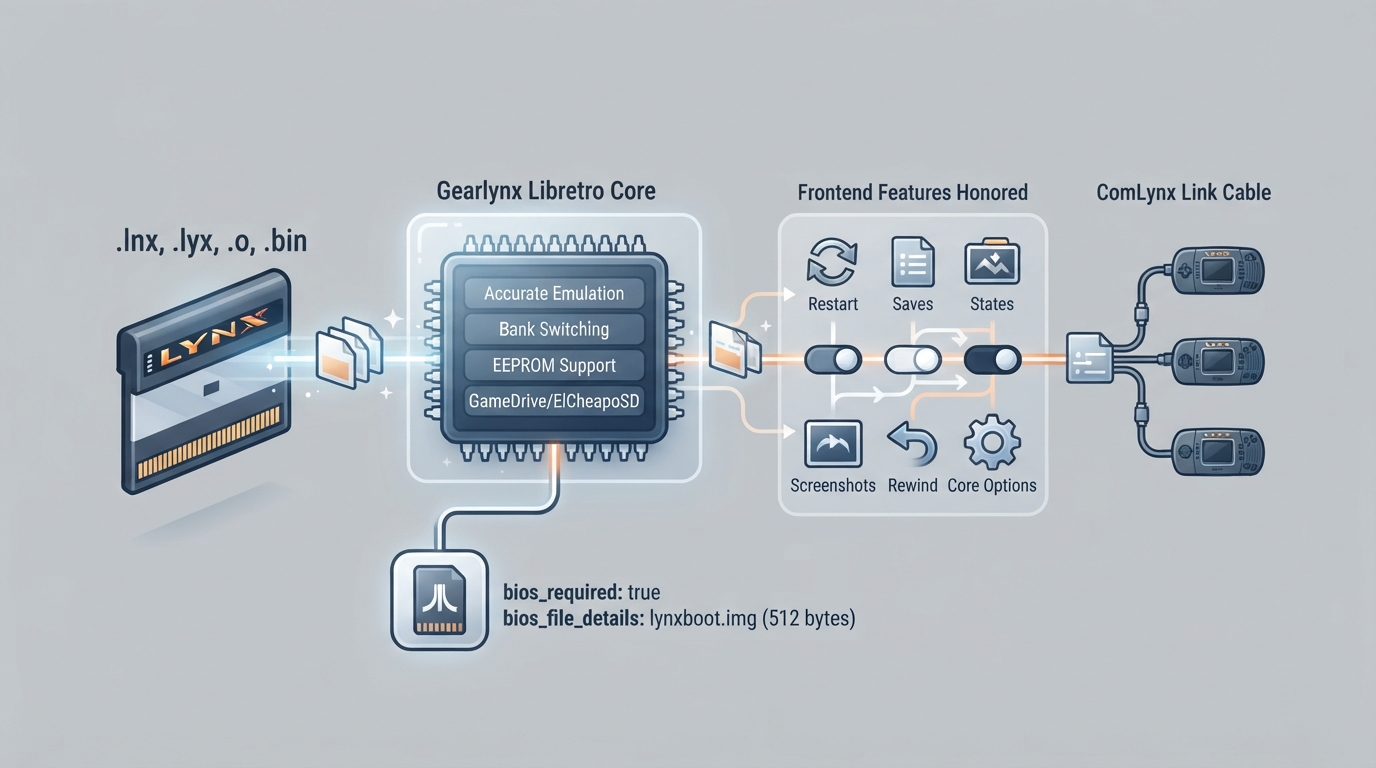
Gearlynx is an open source, cross-platform Atari Lynx emulator written in C++, whose libretro core runs inside RetroArch. It is documented as supporting very accurate emulation across the entire commercial Atari Lynx catalog, with bank switching (BANK1 + AUDIN) and EEPROM support, save files for EEPROM, NVRAM and persistent cartridge RAM, GameDrive and ElCheapoSD cartridges, and ComLynx link-cable play for two to four systems with independent controllers, configurable screens and audio, and multi-ROM subsystem loading. This page walks through what the core needs in order to run, which files it accepts, which frontend features it honors, how its core options change emulated behavior, and how the linked-play and SD-cartridge systems are set up and used.
Prerequisites and first-run setup
Gearlynx requires a BIOS to work, so no content will load until the Lynx boot ROM is in place. The documented firmware filename is lynxboot.img, described as the Lynx Boot Image and marked as required; it is 512 bytes with MD5 checksum fcd403db69f54290b51035d82f835e7b. Place that file in the frontend's system directory. The checksum identifies the recommended original BIOS, but other 512-byte BIOS images are accepted as well.
Content loads with the .lnx, .lyx, .o and .bin extensions. Supported formats include LNX and LNX2 cartridge headers, headerless cartridge images, and BS93 homebrew executables, with LNX2 images using the .lnx extension. To keep frontend scanning tidy, match the core against the documented Atari - Lynx database entry when using database-driven content scanning. No steps for obtaining game content are given here, and no download sources are endorsed.
- Place lynxboot.img in the frontend's system directory.
- Install or select the Gearlynx core in RetroArch.
- Load content using one of the supported extensions.
- If you use database-driven scanning, match the core to the Atari - Lynx database entry.
What the core exposes to the frontend
The documentation records that Gearlynx honors Restart, Screenshots, Saves, States, Rewind, Run-Ahead, Netplay, Core Options, memory monitoring for achievements, RetroArch cheats, Controls, Remapping, Subsystem and Softpatching. It records that Native Cheats, Multi-Mouse, Rumble, Sensors, Camera, Location, Disk Control, Username, Language, Crop Overscan and LEDs are not supported. The practical reading is that frontend-level save/state, cheat and achievement machinery works, while peripheral and display extras drawn from other hardware families are simply absent — the Lynx had none of them.
Core options: shaping an individual game
Core options are set from the core options menu, and the documentation marks the default value for each in bold, with (restart) where a reload is needed. The option set is broad and mostly hardware-modeling: aspect ratio, screen rotation, console type (Lynx I versus Lynx II), EEPROM type, cartridge hardware, sprite renderer, low-pass audio filter, per-channel audio volume, whether simultaneous opposite directions are allowed, and the ComLynx link-cable settings covered below. Options that are not restart-marked, such as aspect ratio, rotation, the sprite renderer, audio filter and volume, and the opposite-direction toggle, can be changed on the fly; those are the ones to tune while a game is running. Options marked (restart) take effect only after the content is restarted or reloaded.
Controls and remapping
Four controller ports exist, and each accepts Joypad Auto or Lynx Pad; Joypad Port Empty disables input on that port. Single-player games use port 1 only. In linked mode each port drives the screen with the same number, and that binding follows the screen even after screens are switched or hidden, so port 3 always controls screen 3. Because Remapping is supported, the RetroPad-to-Lynx mapping can be reassigned per core or per game if the stock layout does not suit you.
Saves, states and where they live
In the frontend's save directory, .srm files hold EEPROM, NVRAM or LNX2 persistent cartridge RAM data, while .srm2, .srm3 and .srm4 hold screen 2, 3 and 4 saves in linked mode. States are written to the frontend's state directory as .state# files. This split matters in practice: the .srm family covers in-cartridge persistence that the emulated game itself maintains, whereas .state# files are frontend snapshots — which is why states, and therefore rewind and run-ahead, are tied to the single-player path.
SD cartridge support: GameDrive and ElCheapoSD
Gearlynx supports GameDrive and ElCheapoSD cartridges, both of which behave as SD storage. The loaded ROM's directory becomes the emulated SD card root, so the files a cartridge expects to find must sit in that directory. If automatic detection does not identify the cartridge, select the appropriate Cartridge Hardware option manually. SD cartridge access requires a frontend with VFS version 3 support and a content path that identifies the ROM directory. Write operations additionally require frontend write support and permission to write to the content directory; those writes update files in that directory and are kept separate from the frontend-managed EEPROM, NVRAM or persistent cartridge RAM .srm save.
ComLynx link cable play
Linked play is documented for two to four systems, with independent controllers, configurable screens and audio, and multi-ROM subsystem loading. It emulates standard ComLynx; Turbo ComLynx is not supported. All linked systems run inside one core instance, and this does not connect to any desktop Gearlynx link session.
- Enable the ComLynx Link Cable Enable option, which is marked (restart).
- Select the number of systems with the Link Players option (2 is default; 3 and 4 are also available), also marked (restart).
- Note that for these two options a plain Restart is not sufficient: use Close Content and then load the ROM again. Independent copies of the same ROM then run together.
- Controller ports 1 to 4 control the corresponding screens; all linked systems keep running even when only one screen is displayed.
- Use the linked screen options to place screens in a grid, horizontally or vertically, to switch between them, to choose which screen is shown, and to pick screen audio.
To link different ROMs rather than the same ROM in several slots, load the 2 Player Lynx Link (lynx_link_2p), 3 Player Lynx Link (lynx_link_3p) or 4 Player Lynx Link (lynx_link_4p) subsystem and select a ROM for each screen. Selecting a subsystem enables linked mode regardless of the enable option, and its player count overrides Link Players. The subsystem can equally load the same ROM into several slots, so it is the more flexible path when players want mismatched cartridges.
retroarch -L gearlynx_libretro.so --subsystem lynx_link_2p first.lnx second.lnx- Use the core library extension for your platform: .dylib on macOS or .dll on Windows.
- Linked mode emulates standard ComLynx; Turbo ComLynx is not supported.
- All linked systems run inside one core instance, and this does not connect to desktop Gearlynx link sessions.
When a single ROM is loaded in linked mode, screen 1 keeps its usual frontend-managed .srm file, while screens 2 to 4 use <content name>.srm2, .srm3 and .srm4 in the frontend's save directory, or alongside the ROM if no save directory is provided. Those files are restored when content loads and written when content unloads or the core shuts down. Content supplied without a path has no automatic save filename for screens 2 to 4. Multi-ROM subsystems expose every cartridge's save memory, and the separate extensions keep saves from overwriting one another when several slots load the same ROM. If you intend to keep linked progress, always load content from a real path rather than a pathless source.
Compatibility and platform notes
Documented emulation features are bank switching (BANK1 + AUDIN), EEPROM, save files for EEPROM, NVRAM and persistent cartridge RAM, GameDrive and ElCheapoSD cartridges, and ComLynx link cable play for two to four systems with independent controllers, configurable screens and audio, plus multi-ROM subsystem loading. The documentation also describes very accurate emulation covering the entire commercial Atari Lynx catalog, and lists an internal database used for automatic ROM detection and hardware selection when Auto is chosen. An external Gearlynx hardware-tests repository is referenced for compatibility details; this summary has not independently evaluated it. The documented libretro platforms are Windows, Linux, macOS, Raspberry Pi, Android, iOS, tvOS, webOS, PlayStation Vita, PlayStation 3, Nintendo 3DS, Nintendo GameCube, Nintendo Wii, Nintendo WiiU, Nintendo Switch, Emscripten, Classic Mini systems such as NES, SNES and C64, OpenDingux, RetroFW and QNX. The core is authored by Nacho Sanchez (drhelius) and licensed under GPLv3.
Reference table · Scroll horizontally to see all columns.
| Filename | Description | Size | MD5 |
|---|---|---|---|
| lynxboot.img | Lynx Boot Image - Required | 512 bytes | fcd403db69f54290b51035d82f835e7b |
Reference table · Scroll horizontally to see all columns.
| Feature | Supported |
|---|---|
| Restart | Yes |
| Screenshots | Yes |
| Saves | Yes |
| States | Yes |
| Rewind | Yes |
| Run-Ahead | Yes |
| Netplay | Yes |
| Core Options | Yes |
| Memory Monitoring (achievements) | Yes |
| RetroArch Cheats | Yes |
| Native Cheats | No |
| Controls | Yes |
| Remapping | Yes |
| Multi-Mouse | No |
| Rumble | No |
| Sensors | No |
| Camera | No |
| Location | No |
| Subsystem | Yes |
| Softpatching | Yes |
| Disk Control | No |
| Username | No |
| Language | No |
| Crop Overscan | No |
| LEDs | No |
Reference table · Scroll horizontally to see all columns.
| File | Description |
|---|---|
| *.srm | EEPROM, NVRAM or LNX2 persistent cartridge RAM save |
| *.srm2, *.srm3, *.srm4 | Screen 2, 3 and 4 saves in linked mode |
| *.state# | State, in the frontend's state directory |
Reference table · Scroll horizontally to see all columns.
| User input descriptor | RetroPad input |
|---|---|
| B | B |
| Pause | Start |
| Up | D-Pad Up |
| Down | D-Pad Down |
| Left | D-Pad Left |
| Right | D-Pad Right |
| A | A |
| Option 1 | L1 |
| Option 2 | R1 |
Reference table · Scroll horizontally to see all columns.
| Option | Values | Restart required |
|---|---|---|
| Aspect Ratio | 1:1 PAR (default), 4:3 DAR, 16:9 DAR, 16:10 DAR | No |
| Screen Rotation | Auto (default), Left, Right, Disabled, 180 | No |
| Console Type | Auto (default), Lynx I, Lynx II | Reset or reload after change |
| EEPROM Type | Auto (default), None, or 93C46 to 93C86 in 16-bit or 8-bit form | Yes |
| Cartridge Hardware | Auto (default), Standard, GameDrive, ElCheapoSD | Yes |
| Legacy Sprite Renderer | Disabled (default), Enabled | No |
| Audio Low-Pass Filter (Hz) | 3500 default; 500 to 5000 | No |
| Audio Channel 0-3 Volume | 100 default; 0 to 200 in steps of 10 | No |
| Allow Up+Down / Left+Right | Disabled (default), Enabled | No |
| ComLynx Link Cable Enable | Disabled (default), Enabled | Yes, via Close Content and reload |
| Link Players | 2 (default), 3, 4 | Yes, via Close Content and reload |
| Linked Screen Placement | Grid (default), Horizontal, Vertical | No |
| Linked Screen Switch | Disabled (default), Enabled | No |
| Linked Screen Selection | All Screens (default), Screen 1-4 | No |
| Linked Screen Audio | Screen 1 (default), Screen 2-4, Mix | No |
Sources & references
Content responsibility: FrameTinker editorial desk. Source authors and software maintainers are credited separately below; this is not a claim of hands-on testing.
Published .
RetroArch: gearlynx — official gaming software documentation https://raw.githubusercontent.com/libretro/docs/master/docs/library/gearlynx.mdRetrieved Oct 13, 2026Something doesn’t match your setup?
Suggest a correction