

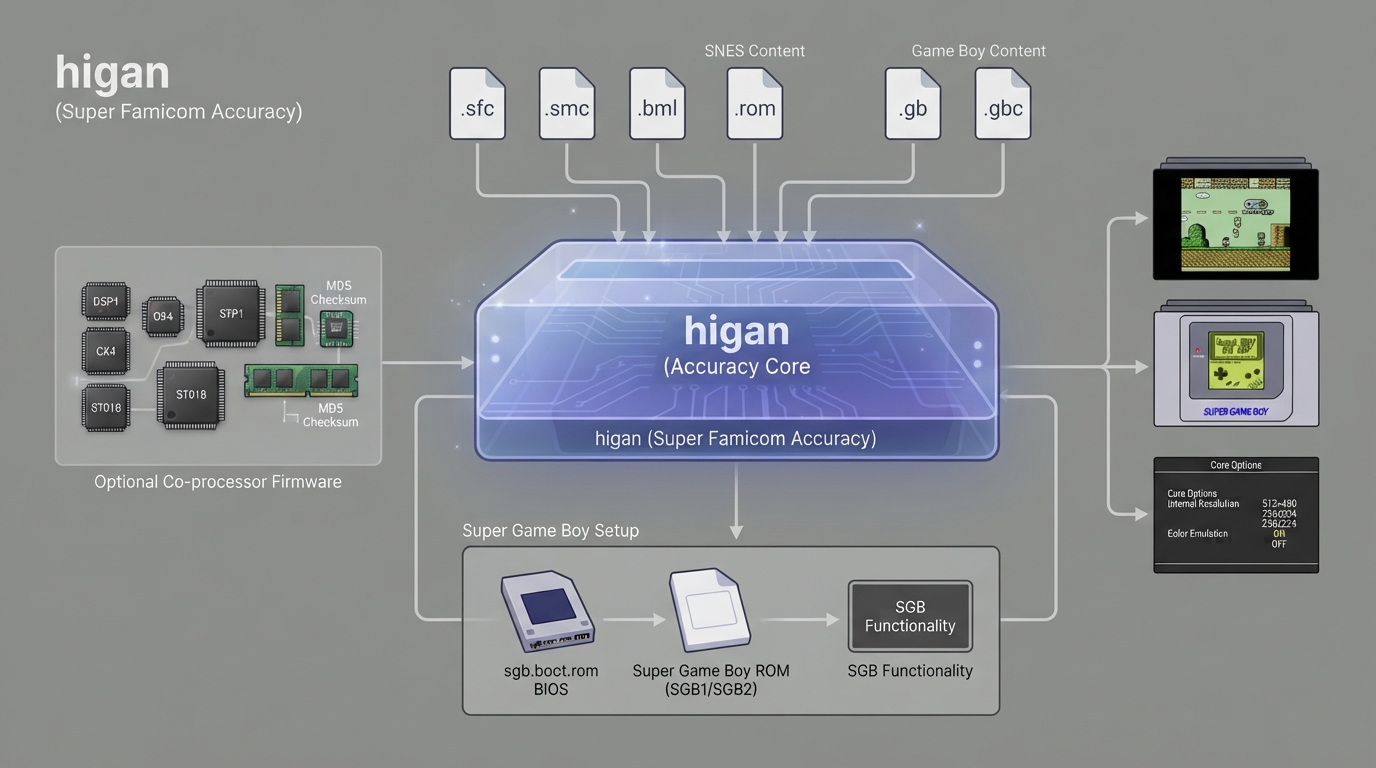
higan Accuracy is a libretro port of higan v106's Super Famicom emulation core, and the documentation describes it as the core most in sync with upstream higan. The same page states it is the most accurate SNES emulation available and offers simplified, easily accessible Super Game Boy functionality compared with the other bsnes cores. This guide organizes that documentation into ordered setup steps for RetroArch users.
What you need before you start
- RetroArch with the higan Accuracy core, which is identified internally as 'higan (Super Famicom Accuracy)'.|Super Famicom / SNES content in one of the supported formats: .sfc, .smc, .gb, .gbc, .bml or .rom.|Optional DSP and special-chip firmware placed in the frontend's system directory if you want those co-processors available.|For Super Game Boy play: a Super Game Boy ROM, a Super Game Boy 2 ROM, and the sgb.boot.rom BIOS.
Step 1: Confirm your content format is supported
The core accepts content with the .sfc, .smc, .gb, .gbc, .bml and .rom extensions. Games that use special chips are loaded from split ROM sets according to the documentation, so mismatched dumps can fail even when the extension is correct.
Step 2: Place optional co-processor firmware
DSP and special-chip firmware files are described as optional and belong in the frontend's system directory. The documentation lists separate data and program files for DSP1, DSP1B, DSP2, DSP3, DSP4, CX4, ST010, ST011 and ST018, each with its own MD5 checksum, which you can use to confirm that a file matches. Games named as examples of these chips include Super Mario Kart and Pilotwings for DSP1, Dungeon Master for DSP2, SD Gundam GX for DSP3, Top Gear 3000 for DSP4, and Mega Man X2 and Mega Man X3 for CX4.
Step 3: Set up Super Game Boy
The core uses a simplified Super Game Boy routine. Rather than requiring command-line subsystem launch arguments, it looks for the needed files in the system or BIOS directory whenever you load a .gb or .gbc file.
- Create two subdirectories inside RetroArch's system directory: one named SGB1.sfc and one named SGB2.sfc.|Copy your original Super Game Boy ROM into SGB1.sfc and rename it to program.rom.|Copy your Super Game Boy 2 ROM into SGB2.sfc and rename it to program.rom as well.|Copy your sgb.boot.rom BIOS into both directories and rename the copies to sgb1.boot.rom and sgb2.boot.rom respectively.|Choose which BIOS to use with the Preferred Super GameBoy BIOS core option, then load a GB or GBC ROM that supports Super Game Boy features.
Step 4: Review the core options
- Internal resolution, with 512x480 as the default and 512x448, 512x240, 512x224, 256x240 and 256x224 as alternatives.|Color emulation, default Off, which simulates how a console's display differs from a modern monitor, including the Super Famicom's slightly different gamma correction.|Blur emulation, default Off, which mimics the limited horizontal resolution of standard-definition TVs; the documentation notes games such as Jurassic Park for the Super Famicom depend on it for a transparency effect.|Scanline emulation, default Off, which the documentation states currently does not function properly.|Preferred Super GameBoy BIOS, a restart-required option that selects either SGB1.sfc/ or SGB2.sfc/.
MSU-1 audio and .bml content
MSU-1 support works by loading a correct .bml file. The documentation describes MSU-1 support in this core as complex and directs readers to use the Snes9x core when they want simplified and easily accessible MSU-1 support.
Step 5: Configure controllers
User 1 and User 2 can each be set to None, SNES Joypad (the default) or SNES Mouse. User 2 additionally offers a Multitap device type, which allows up to five players in multitap games, and the SuperScope, Justifier and Justifiers lightgun types. The documentation states the lightgun inputs are not hooked up in this core. Joypad remap descriptors map B, Y, Select, Start, D-Pad directions, A, X, L and R to RetroPad inputs, and the SNES Mouse maps cursor movement plus left and right buttons to the RetroMouse.
Documented compatibility and limits
The documentation states the core fully emulates all SNES games that have ever been officially released. It also states the core is incompatible with ROM hacks made to take advantage of emulator quirks, which the documentation compares to the behavior of real hardware.
Supported frontend features
- Reported as supported: Restart, Screenshots, Saves, States, Rewind, Netplay, Core Options, Controls, Remapping and Softpatching.|Reported as unsupported: Memory Monitoring achievements, RetroArch Cheats, Native Cheats, Rumble, Sensors, Camera, Location, Subsystem, Disk Control, Username, Language and LEDs.|Multi-Mouse and Crop Overscan are listed without a supported or unsupported value.
Where saves and states go
Cartridge battery saves are written to the frontend's Save directory as 'content-name'.srm, and states are written to the frontend's State directory as 'content-name'.state#. The documentation lists the core's provided FPS, sample rate and aspect ratio as placeholder fields rather than concrete values, so those figures should be checked in RetroArch itself.
The core was authored by byuu and is licensed under GPLv3.
Reference table · Scroll horizontally to see all columns.
| Firmware file | Purpose | Optional |
|---|---|---|
| dsp1.data.rom / dsp1.program.rom | DSP1 co-processor firmware | Yes |
| dsp1b.data.rom / dsp1b.program.rom | DSP1B co-processor firmware | Yes |
| dsp2.data.rom / dsp2.program.rom | DSP2 co-processor firmware | Yes |
| dsp3.data.rom / dsp3.program.rom | DSP3 co-processor firmware | Yes |
| dsp4.data.rom / dsp4.program.rom | DSP4 co-processor firmware | Yes |
| cx4.data.rom | CX4 co-processor firmware | Yes |
| st010.data.rom / st010.program.rom | ST010 co-processor firmware | Yes |
| st011.data.rom / st011.program.rom | ST011 co-processor firmware | Yes |
| st018.data.rom / st018.program.rom | ST018 co-processor firmware | Yes |
| SGB1.sfc/sgb1.boot.rom | Super Game Boy BIOS | Yes |
| SGB1.sfc/program.rom | Super Game Boy ROM | Yes |
| SGB2.sfc/sgb2.boot.rom | Super Game Boy 2 BIOS | Yes |
| SGB2.sfc/program.rom | Super Game Boy 2 ROM | Yes |
RetroArch system directory/
  SGB1.sfc/
    program.rom      (your original Super Game Boy ROM, renamed)
    sgb1.boot.rom    (sgb.boot.rom BIOS, renamed)
  SGB2.sfc/
    program.rom      (your Super Game Boy 2 ROM, renamed)
sgb2.boot.rom (sgb.boot.rom BIOS, renamed)Sources & references
Content responsibility: FrameTinker editorial desk. Source authors and software maintainers are credited separately below; this is not a claim of hands-on testing.
Published .
RetroArch: higan accuracy — official gaming software documentation https://raw.githubusercontent.com/libretro/docs/master/docs/library/higan_accuracy.mdRetrieved Oct 13, 2026Something doesn’t match your setup?
Suggest a correction