

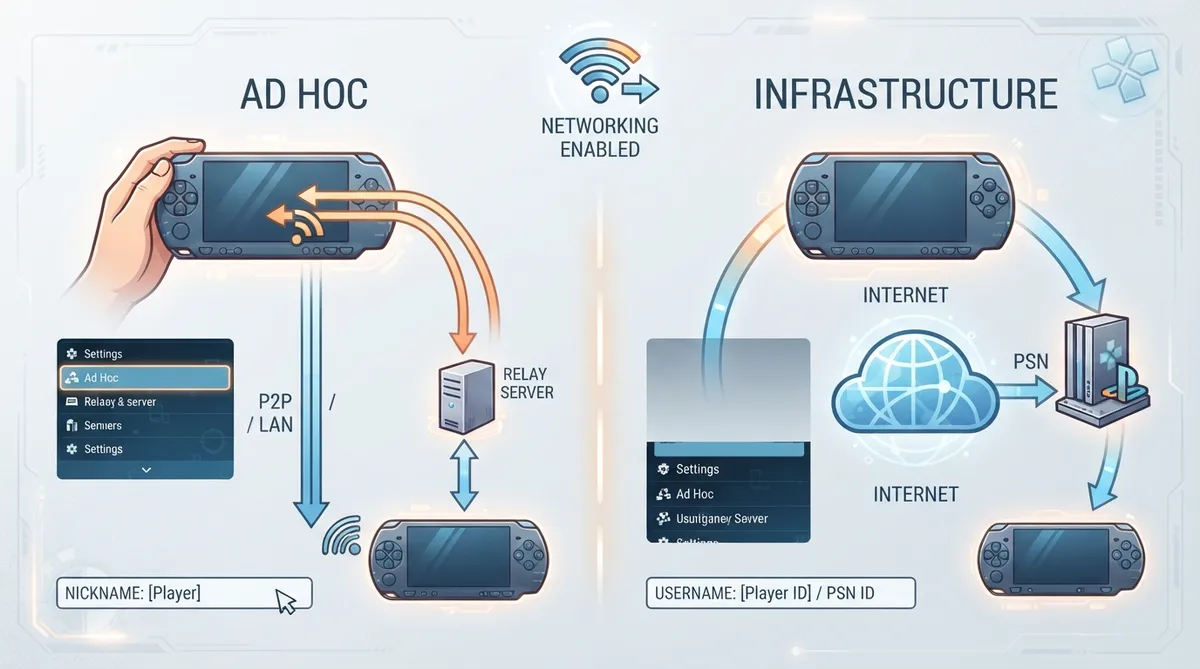
PPSSPP supports two distinct routes for multiplayer: ad hoc and infrastructure. The PSP itself supports these as two fundamentally different methods — infrastructure connects games to PSN or other servers, much like most modern multiplayer games, while ad hoc is peer-to-peer and was intended for players in the same room, comparable to a wireless Game Boy link cable. The official quickstart documentation lays out the minimal setup for each route.
Prerequisite: enable networking
Before either multiplayer route, enable networking on the "Networking" tab in PPSSPP's settings. The documentation notes that the tab looks like a Wi-Fi symbol in portrait mode.
After networking is enabled, the documentation divides setup by which path you want: ad hoc (relay servers, LAN, or peer-to-peer) or infrastructure.
Ad hoc via relay servers (PPSSPP 1.20.1 and newer)
The documentation states that from PPSSPP 1.20.1 and upwards, playing ad hoc over the internet is very easy thanks to relay servers. In Settings / Networking, under "Ad Hoc multiplayer", set up a Nickname and choose a server to play on. For ad hoc, this nickname is the same as the system nickname on the emulated PSP, which the documentation notes differs from how infrastructure handles naming.
The server list is available directly in the app, and the documentation also points to a browsable ad hoc server list outside the app.
Ad hoc on a LAN
The quickstart also covers ad hoc over a local network. The page title for that section indicates LAN ad hoc support, though this article does not reproduce step-by-step LAN instructions beyond that scope note.
Peer-to-peer ad hoc
The documentation describes P2P ad hoc mode as more efficient than relay servers but requiring a more complicated setup. It does not characterize it as faster in latency terms or as suitable for every game in the quickstart excerpt.
Infrastructure multiplayer
After enabling networking, the documentation says all you need is to set a Username under Infrastructure in PPSSPP's Networking settings. Then, in the documentation's words, things will "just work" in supported games. The page also notes that not all games with infrastructure gameplay have revival servers yet, but many do, and that PPSSPP is, from version 1.19.3, set up to autoconfigure everything.
The quickstart states that some games support one method or the other, and some support both. Which method a given title uses determines whether you follow the ad hoc or infrastructure path.
The documentation does not supply explicit recovery steps for failed connections in the quickstart. The only version-related caveats it gives are the PPSSPP 1.20.1 threshold for relay-server ad hoc and the 1.19.3 threshold for infrastructure autoconfiguration, so confirming your build meets those versions is the documented prerequisite check.
Reference table · Scroll horizontally to see all columns.
| Path | Where configured | Key field | Version note |
|---|---|---|---|
| Ad hoc (relay) | Settings / Networking → Ad Hoc multiplayer | Nickname and server choice | Relay servers easy from PPSSPP 1.20.1 and newer |
| Ad hoc (LAN) | Settings / Networking | Nickname | Covered in quickstart section on ad hoc on LAN |
| Ad hoc (P2P) | Settings / Networking | Nickname | More efficient but more complicated setup, per documentation |
| Infrastructure | Settings / Networking → Infrastructure | Username | Autoconfigured from PPSSPP 1.19.3 |
Sources & references
Content responsibility: FrameTinker editorial desk. Source authors and software maintainers are credited separately below; this is not a claim of hands-on testing.
Published .
PPSSPP: quickstart — official gaming software documentation https://raw.githubusercontent.com/hrydgard/ppsspp-site/main/docs/multiplayer/quickstart.mdRetrieved Oct 19, 2026Something doesn’t match your setup?
Suggest a correction