

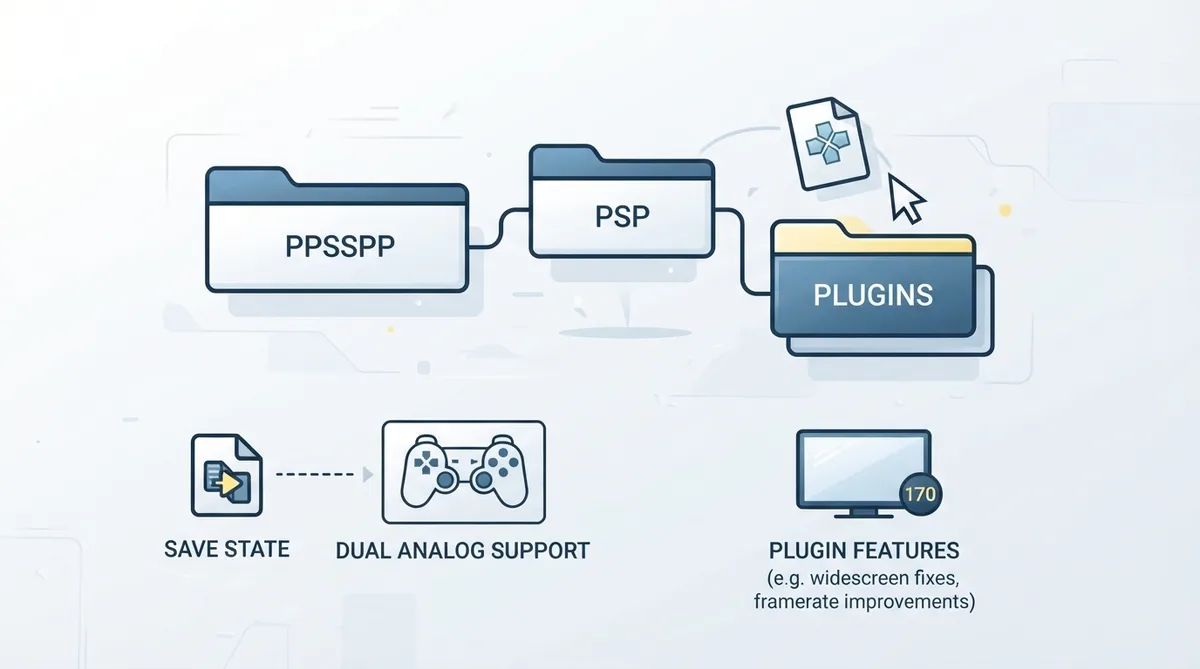
PPSSPP does not support traditional PSP plugins, because those often depend too tightly on the PSP operating system kernel to function in an emulator that only imitates that kernel. The emulator does, however, support plugins made specifically for PPSSPP. According to the official documentation, these are planned to be downloadable and activated directly from the app in the future, but at present they remain somewhat obscure to find and use.
Installing an emulator plugin
- 1. Obtain a plugin built for PPSSPP rather than a traditional PSP plugin.
- 2. Copy the plugin into the PSP/PLUGINS folder inside your Memory Stick directory.
Save states and in-game saves
Plugins are compatible with save states, but updating or removing a plugin does not affect an existing save state. While using plugins, the documentation advises preferring in-game saves whenever possible.
Second analog stick support
Some plugins can add second analog stick support. To make full use of that feature, the second analog stick needs to be configured in the controls menu.
Documented plugin examples
The documentation points to a collection of plugins for titles including GTA, Splinter Cell and The Warriors, describing ultra-widescreen fixes, framerate improvements and more. It also names plugins for second analog stick support in GTA games, better controls for Gran Turismo PSP (analog throttle and brake, removed deadzone) and better controls for Metal Gear Solid: Peace Walker.
Developing plugins for PPSSPP
A plugin can be created and compiled with the pspsdk, in this case named patch.prx, and it will be loaded. However, many kernel or HEN functions cannot be used because they do not work in PPSSPP, whose internal architecture is different. A plugin can still call the same functions games can call and can update RAM.
The documentation notes that memory = 64 under [options] can allocate more RAM, up to 93 MB due to memory map limitations. It warns that this gives the game more RAM overall and may affect cheats and memory management in the game.
Reference table · Scroll horizontally to see all columns.
| Topic | Documented status |
|---|---|
| Traditional PSP plugins | Not supported |
| Plugins made for PPSSPP | Supported |
| Typical install location | PSP/PLUGINS in the Memory Stick directory |
| Save states with plugins | Compatible; updating or removing a plugin does not affect the save state |
| Second analog stick | May require configuration in the controls menu |
Sources & references
Content responsibility: FrameTinker editorial desk. Source authors and software maintainers are credited separately below; this is not a claim of hands-on testing.
Published .
PPSSPP: plugins — official gaming software documentation https://raw.githubusercontent.com/hrydgard/ppsspp-site/main/docs/reference/plugins.mdRetrieved Oct 26, 2026Something doesn’t match your setup?
Suggest a correction