

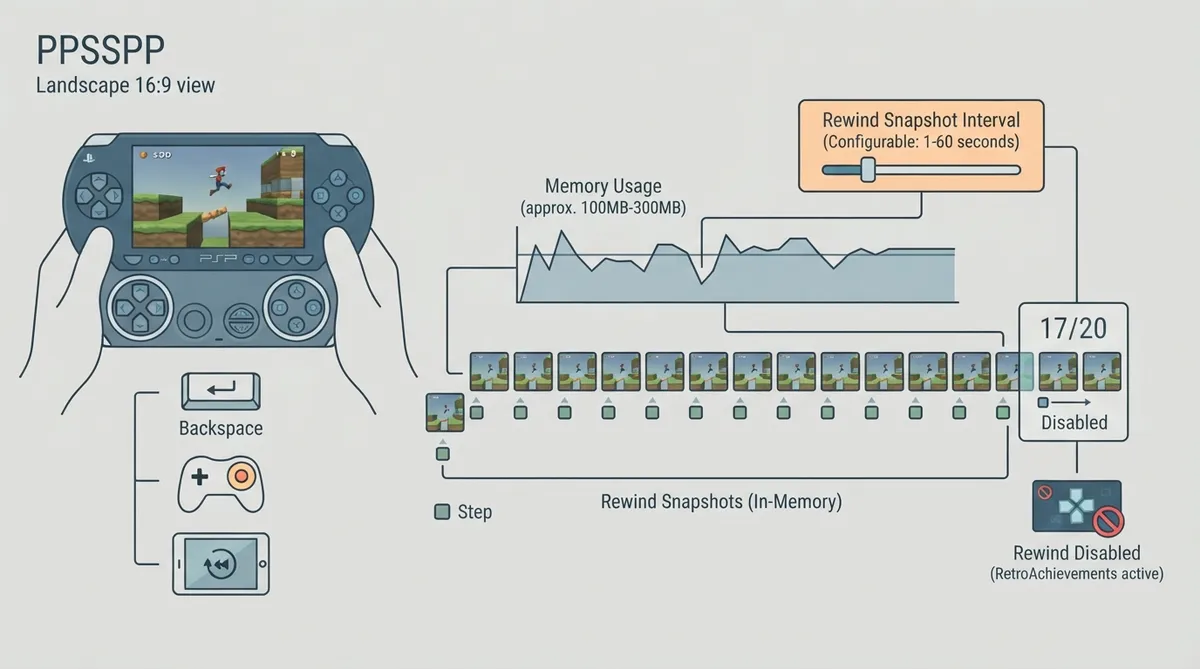
Rewind in PPSSPP lets you jump back a few seconds after a mistake. While the feature is on, the emulator periodically takes an in-memory save state (a snapshot), and pressing Rewind loads the most recent one. It is off by default because it uses a fair amount of memory.
Turn Rewind on
- 1. Open Settings > System.
- 2. In the Emulation section, find Rewind Snapshot Interval (mem hog).
- 3. Set it to the number of seconds you want between snapshots. The documented range is 1 to 60 seconds; Off turns the feature off.
The interval is the gap between snapshots, so a shorter interval means finer-grained rewind points. The documentation does not describe a recommended interval; choose based on how far back each step should take you and how much memory you can spare.
Keep Rewind only for some games
The setting can be configured per game through a game-specific config, so you can leave Rewind on only for the titles where you want it rather than globally.
How to trigger Rewind
- - Press the key or button mapped to Rewind in Settings > Controls > Control mapping. On a keyboard, Backspace is the default. Controllers have no default mapping, so you must map a button yourself.
- - Open the pause menu and press the Rewind button. It appears when the feature is on and is grayed out until the first snapshot has been taken.
- - On touch screens, add a custom button to the touch layout and set it to Rewind.
How many steps back you get
PPSSPP keeps the 20 most recent snapshots, so you can go back up to 20 steps, which is 20 times the interval. At a 5-second interval that is a bit over a minute and a half. When a new snapshot is taken, the oldest is dropped, so memory use does not keep growing the longer you play.
Because of how snapshots are compressed, the oldest few can sometimes become unusable. The documentation suggests counting on about 17 usable steps rather than 20.
Memory expectations
A full PSP save state is roughly 35-70 MB, mostly the PSP's RAM. Instead of storing 20 full copies, PPSSPP keeps two full snapshots and stores the rest as differences against them, which are usually much smaller. Even so, expect the feature to use somewhere between 100 and a few hundred MB depending on the game. That is not a problem on most PCs, but on phones with little memory it is worth leaving off.
When Rewind is unavailable
- - Rewind is disabled in RetroAchievements hardcore mode, just like save states.
- - It is also disabled when playing online in modes where save states are not allowed.
- - A snapshot is a save state, so it carries the same caveats. It is taken at an arbitrary point, which in rare cases can be one where the game does not like being restored.
Reference table · Scroll horizontally to see all columns.
| Setting | Where to find it | Documented values |
|---|---|---|
| Rewind Snapshot Interval (mem hog) | Settings > System > Emulation | Off, or 1 to 60 seconds |
| Rewind input mapping | Settings > Controls > Control mapping | Keyboard default: Backspace; no controller default |
| Rewind button (pause menu) | Pause menu | Available when the feature is on; grayed out until the first snapshot |
| Rewind touch button | Custom touch layout | Add a custom button set to Rewind |
Reference table · Scroll horizontally to see all columns.
| Item | Documented detail |
|---|---|
| Snapshots retained | 20 most recent |
| Practical usable steps | About 17 |
| Full save state size | Roughly 35-70 MB |
| Estimated feature memory use | 100 to a few hundred MB depending on the game |
| Disabled in | RetroAchievements hardcore mode; online modes where save states are not allowed |
Sources & references
Content responsibility: FrameTinker editorial desk. Source authors and software maintainers are credited separately below; this is not a claim of hands-on testing.
Published .
PPSSPP: rewind — official gaming software documentation https://raw.githubusercontent.com/hrydgard/ppsspp-site/main/docs/reference/rewind.mdRetrieved Oct 19, 2026Something doesn’t match your setup?
Suggest a correction