

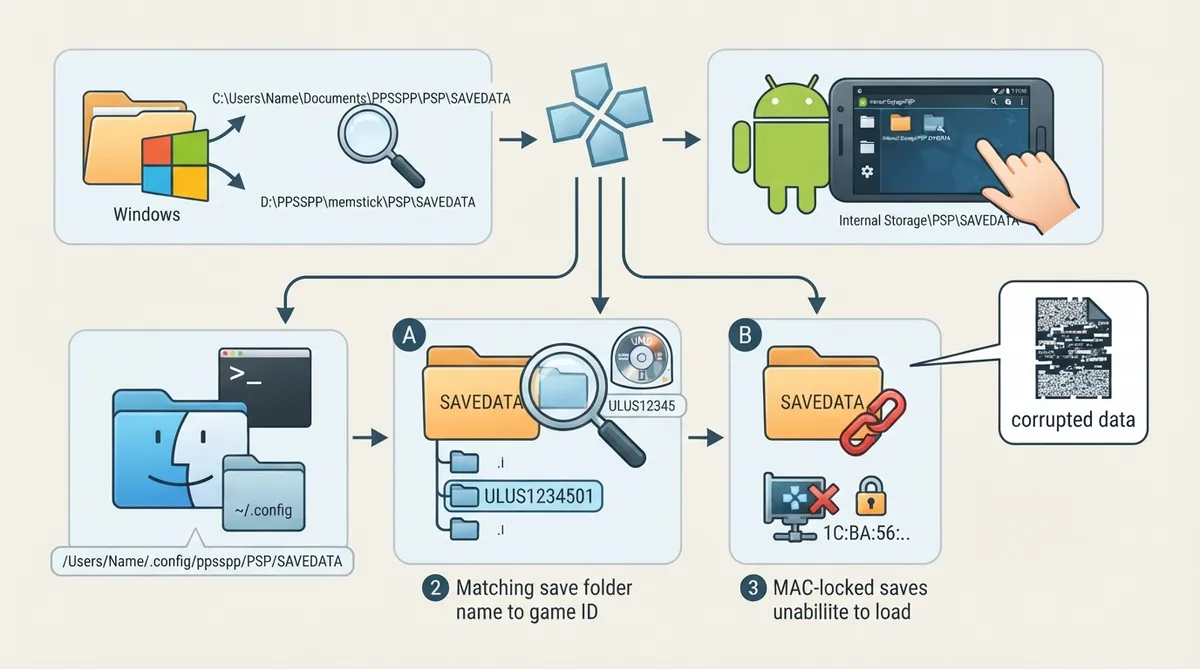
PPSSPP keeps save games in a "Memory Stick," which is simply a folder on your device. When a save won't appear in-game, the usual suspects are that PPSSPP is reading a different Memory Stick location than where the save actually sits, that the save folder name doesn't match the game, that a game has tied the save to a specific device, or that the save data itself is corrupted. The steps below follow the official PPSSPP troubleshooting documentation.
Step 1: Locate the Memory Stick folder for your platform
Save data always lives inside the Memory Stick folder, typically under PSP/SAVEDATA, but where that Memory Stick folder itself is depends on your platform and how PPSSPP was installed.
- Windows (portable/zip install): the memstick folder next to the PPSSPP program — for example the memstick folder beside the executable if you extracted a zip into Downloads or the Desktop.|Windows (when files can't be written next to the program, often because it sits in Program Files): a PPSSPP folder inside My Documents.|Android: the Memory Stick is your device storage, mirroring how a real PSP works.|macOS and Linux: the Memory Stick is in your home/user folder under ~/.config/ppsspp; you can use Go To and paste that path into Finder or another file manager.
If the saves you expect aren't showing up, confirm whether your install is using the folder next to the program or the one inside My Documents on Windows, and compare it with where the save actually is.
Step 2: Match the save folder name to the game ID
Games almost always store each save in its own folder inside SAVEDATA, and that folder name starts with the game ID. A save for a game with ID ULUS12345 might sit in a folder named ULUS1234501, where "01" is the save slot. This matches the structure used on a real PSP and in downloaded save data. If the folder name doesn't follow this pattern, the game may not recognize the save.
- To see a game's ID, long press the game in PPSSPP; the ID typically appears at the end of the title, for example ULUS12345.
Step 3: Handle saves locked to a device's MAC address
Some games lock savedata to a specific device using the MAC address of the WLAN chip, which looks something like 1c:ba:24:f3:a9:57. A save made on one device will not load on another unless the MAC address matches the device it was originally saved on.
- If the save came from a real PSP, find that PSP's MAC address under Settings, then System, then System Information; many PSPs display it there.|In PPSSPP, open Network settings and set PPSSPP's MAC address to match the device the game was originally saved on.|If the save came from another PPSSPP install, write down that install's MAC address and enter it in your local instance.|Note your current MAC address before changing it so you can restore it later.
Step 4: Check whether the save data is corrupted
- Documented causes of save corruption include: hacked savedata or downloaded hacked savedata, cheats, a crash or power loss while saving, and bugs in PPSSPP (rare) or in the game itself. Some games are also known to delete saves when free space is low.
Step 5: Check for known game-specific issues
Saves work well in most cases, but bugs sometimes occur. Check the PPSSPP forum to see whether other people report the same problem with the same game; that can tell you whether the failure is a known issue rather than something wrong with your setup.
Reference table · Scroll horizontally to see all columns.
| Platform / install type | Where to look |
|---|---|
| Windows (zip install, e.g. in Downloads or Desktop) | memstick folder next to the PPSSPP program |
| Windows (program can't write next to itself, e.g. in Program Files) | PPSSPP folder inside My Documents |
| Android | Device storage |
| macOS and Linux | ~/.config/ppsspp in your home/user folder |
Sources & references
Content responsibility: FrameTinker editorial desk. Source authors and software maintainers are credited separately below; this is not a claim of hands-on testing.
Published .
PPSSPP: my saves wont load — official gaming software documentation https://raw.githubusercontent.com/hrydgard/ppsspp-site/main/docs/troubleshooting/my-saves-wont-load.mdRetrieved Oct 19, 2026Something doesn’t match your setup?
Suggest a correction