

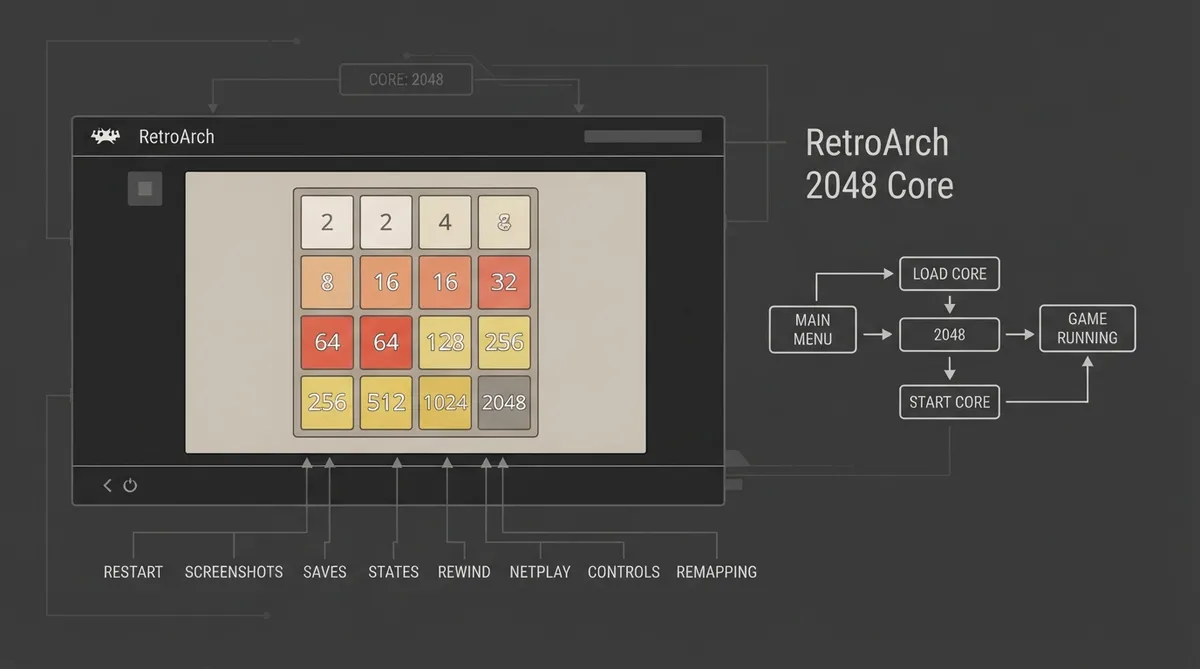
This guide summarizes the official libretro documentation page for the 2048 core, a port of the game 2048 to libretro. It describes how to start the core in RetroArch, what features it supports, where it stores saves and states, and how its controls are mapped.
Prerequisites
- RetroArch installed with its main menu accessible.
- The 2048 core available in your RetroArch core list.
How to Start the 2048 Core
1. Open RetroArch and go to the main menu screen. Select 'Load Core', then choose '2048'.
2. Select 'Start Core'. According to the documentation, the content should then start running.
Supported Features
The documentation lists the frontend-level settings and features the 2048 core respects. Supported features include Restart, Screenshots, Saves, States, Rewind, Netplay, Controls, and Remapping. Features not supported include Core Options, memory monitoring for achievements, RetroArch Cheats, Native Cheats, Multi-Mouse, Rumble, Sensors, Camera, Location, Subsystem, Softpatching, Disk Control, Username, Language, Crop Overscan, and LEDs.
Core Name, Files, and Timing
The core's internal name is '2048'. The core saves and loads from the frontend's Save directory under '2048.srm' (previous game sessions and hiscores) and from the frontend's State directory under '2048.state#' (state). Its core-provided FPS is 60, its core-provided sample rate is 30000 Hz, and its core-provided aspect ratio is 1.
Controller Device Types
In the controls menu, User 1 device types include None, which does not disable input; RetroPad, the joypad and the default; and RetroPad w/Analog, also a joypad, for which the documentation notes there is no reason to switch to it.
Joypad Mapping
- Pause maps to the RetroPad Select input.
- Start maps to the RetroPad Start input.
- Up maps to the RetroPad D-pad Up input.
- Down maps to the RetroPad D-pad Down input.
- Left maps to the RetroPad D-pad Left input.
- Right maps to the RetroPad D-pad Right input.
Authors and License
Recovery and Verification Notes
The documentation does not describe troubleshooting steps or recovery procedures. If the core does not appear in the RetroArch core list or 'Start Core' does not launch the content, consult the core's issue tracker or the linked license and development documentation for further information.
Reference table · Scroll horizontally to see all columns.
| Feature | Supported |
|---|---|
| Restart | Yes |
| Screenshots | Yes |
| Saves | Yes |
| States | Yes |
| Rewind | Yes |
| Netplay | Yes |
| Core Options | No |
| Memory Monitoring (achievements) | No |
| RetroArch Cheats | No |
| Native Cheats | No |
| Controls | Yes |
| Remapping | Yes |
| Multi-Mouse | No |
| Rumble | No |
| Sensors | No |
| Camera | No |
| Location | No |
| Subsystem | No |
| Softpatching | No |
| Disk Control | No |
| Username | No |
| Language | No |
| Crop Overscan | No |
| LEDs | No |
Reference table · Scroll horizontally to see all columns.
| Property | Value |
|---|---|
| Core name | 2048 |
| Save file | 2048.srm (previous game sessions and hiscores) |
| State file | 2048.state# (state) |
| FPS | 60 |
| Sample rate | 30000 Hz |
| Aspect ratio | 1 |
Sources & references
Content responsibility: FrameTinker editorial desk. Source authors and software maintainers are credited separately below; this is not a claim of hands-on testing.
Published .
RetroArch: 2048 — official gaming software documentation https://raw.githubusercontent.com/libretro/docs/master/docs/library/2048.mdRetrieved Oct 12, 2026Something doesn’t match your setup?
Suggest a correction