

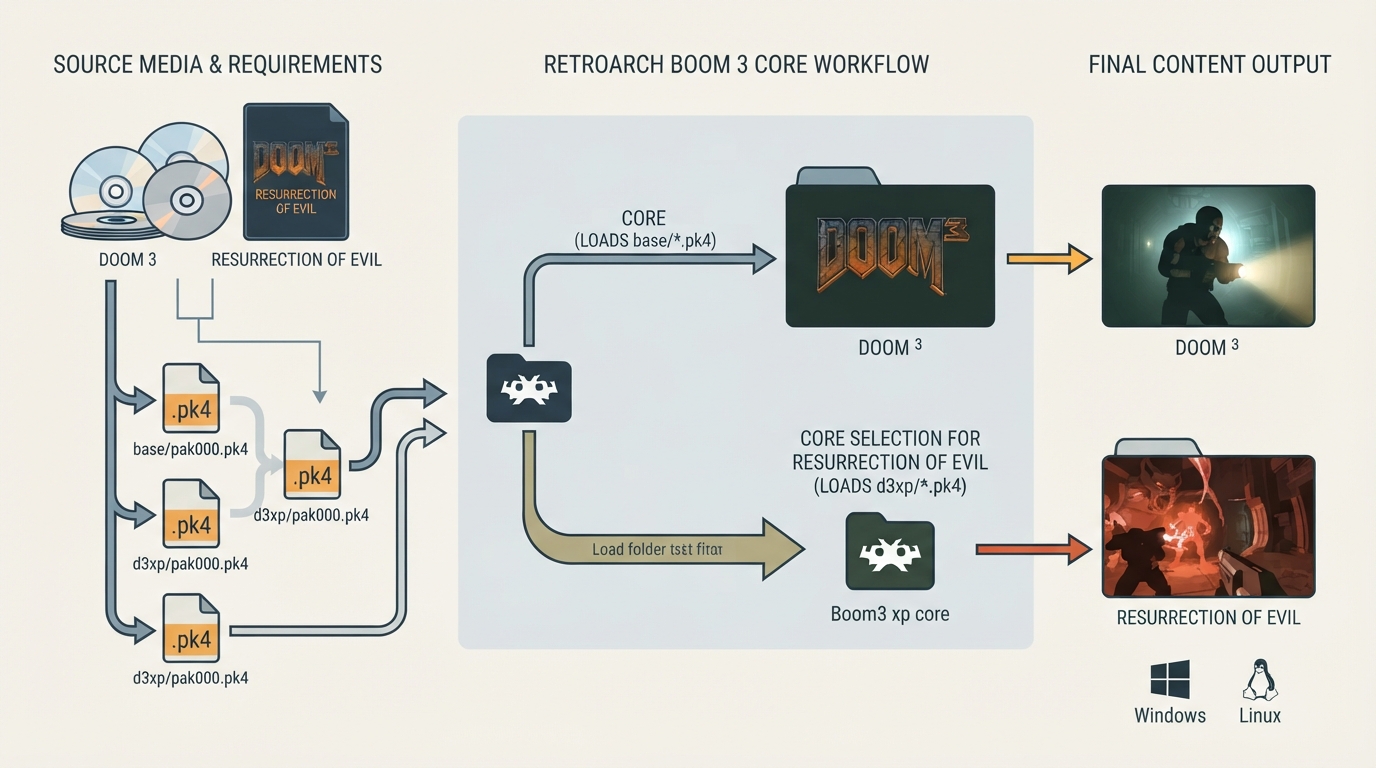
Boom 3 is a GPL source port of Doom 3 and Doom 3: Resurrection of Evil, documented as known to work on Windows and Linux. This guide summarizes the official libretro documentation: what content the core loads, which game data files are required, how to arrange them, which core to use for the expansion, and which options and input devices the core exposes.
Before you start
Boom 3 is documented as known to work on Windows and Linux. Doom 3 is a sci-fi horror first-person shooter developed by id Software and published by Activision.
The Boom 3 core loads content with the .pk4 file extension, and it is listed under the DOOM RetroArch database.
There are no required BIOS files for the Boom 3 core.
The core requires game data files. The documentation points to Doom 3 and the Resurrection of Evil add-on as the sources for this data. If you own the game on CDs or DVDs, base/pak000.pk4 through base/pak004.pk4 and d3xp/pak000.pk4 can be copied from the discs; the remaining files come from the patch.
Required and optional game data files
- Main game files: base/pak000.pk4, base/pak001.pk4, base/pak002.pk4, base/pak003.pk4, base/pak004.pk4, base/pak005.pk4, base/pak006.pk4, base/pak007.pk4, base/pak008.pk4.
- Resurrection of Evil add-on (optional for the base game): d3xp/pak000.pk4, d3xp/pak001.pk4.
Folder layout
The documentation shows a content directory with a doom3 parent folder containing base/ and d3xp/ subfolders, each holding the corresponding .pk4 files.
contents/
└── doom3/
    ├── base/
    │   ├── pak000.pk4
    │   ├── pak001.pk4
    │   ├── pak002.pk4
    │   ├── pak003.pk4
    │   ├── pak004.pk4
    │   ├── pak005.pk4
    │   ├── pak006.pk4
    │   ├── pak007.pk4
    │   └── pak008.pk4
    └── d3xp/
        ├── pak000.pk4
        └── pak001.pk4
Loading Doom 3
- Place the base/pak000.pk4 through base/pak008.pk4 files in the base folder as shown above.
- Start RetroArch and load the Boom 3 core.
- Load a .pk4 file from the base folder as content.
- Game saves and internal configuration files are created in the content directory, organized in folders matching the filenames of loaded content. Saves are named after mission names.
Loading Resurrection of Evil
Doom 3: Resurrection of Evil is a horror first-person shooter developed by Nerve Software and published by Activision. To load it in RetroArch, you need to use the Boom 3 xp core rather than the Boom 3 core. After the core is loaded, you can load the expansion's .pk4 file from the d3xp folder.
The documentation links the Boom 3 xp core to a release archive on GitHub for now.
Core options
The Boom 3 core exposes several options from the core options menu. Options marked with Restart require the core to be closed before the new setting takes effect on next launch.
- Framerate (restart): Auto, 50fps, 60fps, 72fps, 75fps, 90fps, 100fps, 119fps, 120fps, 144fps, 155fps, 160fps, 165fps, 180fps, 200fps, 240fps, 244fps, 300fps, 360fps. Auto is the default.
- Internal Resolution (restart): 480x272, 640x368, 720x408, 960x544, 1280x720, 1920x1080, 2560x1440, 3840x2160. 640x368 is the default.
- Invert Y Axis: OFF or ON. OFF is the default. Inverts the gamepad right analog stick's Y axis.
- Show FPS: OFF or ON. OFF is the default. Shows framerate on screen.
Input device types
The Boom 3 core supports these user 1 device types in the controls menu: None (input disabled), Gamepad Classic, Gamepad Classic Alt and Gamepad Modern. Gamepad Classic and Gamepad Classic Alt are the default device types for the specified user.
Geometry and timing defaults
By default, the core provides 60 FPS and a 44100 Hz sample rate, with an aspect ratio of 4/3. Base width, base height, max width and max height depend on the Internal Resolution core option.
Reference table · Scroll horizontally to see all columns.
| Feature | Supported |
|---|---|
| Restart | No |
| Screenshots | Yes |
| Saves | Yes |
| States | No |
| Rewind | No |
| Netplay | No |
| Core Options | Yes |
| Memory Monitoring (achievements) | No |
| RetroArch Cheats | Yes |
| Native Cheats | Yes |
| Controls | Yes |
| Remapping | Yes |
| Multi-Mouse | No |
| Rumble | No |
| Sensors | No |
| Camera | No |
| Location | No |
| Subsystem | No |
| Softpatching | No |
| Disk Control | No |
| Username | No |
| Language | No |
| Crop Overscan | No |
| LEDs | No |
Reference table · Scroll horizontally to see all columns.
| RetroPad Input | Function (Gamepad Classic) |
|---|---|
| B | Use |
| Y | Run |
| Select | Show/Hide Map |
| Start | Show/Hide Menu |
| D-Pad Up | D-Pad Up |
| D-Pad Down | D-Pad Down |
| D-Pad Left | D-Pad Left |
| D-Pad Right | D-Pad Right |
| A | Fire |
| X | Strafe |
| L1 | Strafe Left |
| R1 | Strafe Right |
| L2 | Previous Weapon |
| R2 | Next Weapon |
Reference table · Scroll horizontally to see all columns.
| RetroPad Input | Function (Gamepad Modern) |
|---|---|
| B | Menu Cancel |
| Y | Quick Save |
| Select | Show/Hide Map |
| Start | Show/Hide Menu |
| D-Pad Up | D-Pad Up |
| D-Pad Down | D-Pad Down |
| D-Pad Left | D-Pad Left |
| D-Pad Right | D-Pad Right |
| A | Menu Select |
| X | Quick Load |
| L1 | Previous Weapon |
| R1 | Next Weapon |
| L2 | Use |
| R2 | Fire |
| L3 | Toggle Run |
| R3 | 180 Turn |
| Left Stick X | Strafe Left/Right |
| Left Stick Y | Move Forwards/Backwards |
| Right Stick X | Look Left/Right |
Sources & references
Content responsibility: FrameTinker editorial desk. Source authors and software maintainers are credited separately below; this is not a claim of hands-on testing.
Published .
RetroArch: boom3 — official gaming software documentation https://raw.githubusercontent.com/libretro/docs/master/docs/library/boom3.mdRetrieved Oct 12, 2026Something doesn’t match your setup?
Suggest a correction