

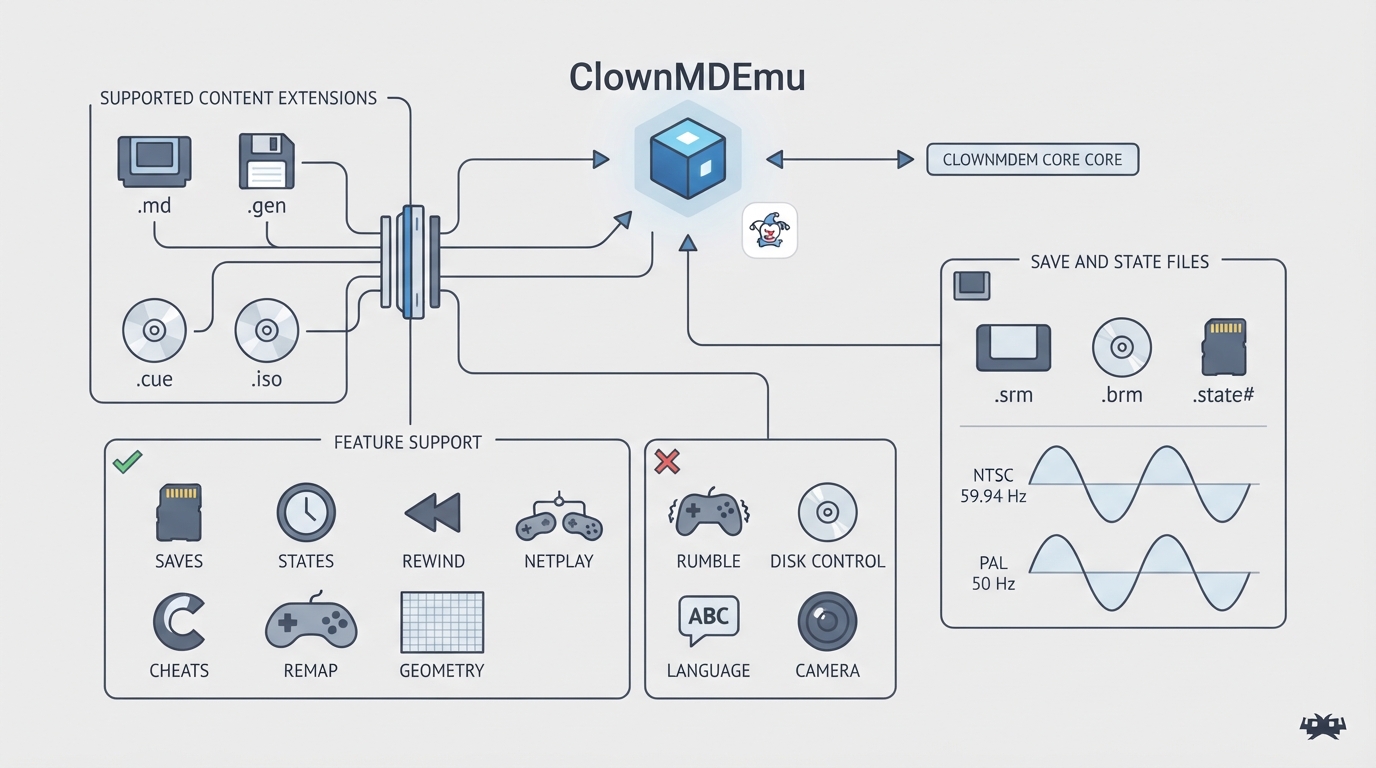
ClownMDEmu is a highly portable Sega Mega Drive emulator that aims to be as fast as possible without sacrificing accuracy. In RetroArch it is available as the ClownMDEmu core, authored by Clownacy and licensed under AGPLv3. This guide compiles the concrete settings and values described in the official libretro core documentation so you can load, configure, and save Mega Drive and Mega CD content with predictable results.
Supported content and associated databases
The ClownMDEmu core can load content with the following file extensions: .bin, .md, .gen, .cue, .iso, and .chd. The libretro documentation associates the core with the Sega - Mega Drive - Genesis and Sega - Mega-CD - Sega CD RetroArch databases.
Feature support
According to the official documentation, the core respects these frontend-level features: Restart, Saves, States, Rewind, Netplay, Core Options, Memory Monitoring for achievements, RetroArch Cheats, Native Cheats, Controls, Remapping, Subsystem, and Softpatching.
The same documentation lists these features as unsupported: Multi-Mouse, Rumble, Sensors, Camera, Location, Disk Control, Username, Language, Crop Overscan, and LEDs.
Save and state files
The core's library name is ClownMDEmu. In the frontend's Save directory, the core writes .srm files for Mega Drive/Genesis save data and .brm files for Mega CD/Sega CD save data. In the frontend's State directory, it writes .state# files.
Geometry and timing
The core provides 59.94 FPS for NTSC games and 50 FPS for PAL games, and a sample rate of 223721.5625 Hz. The base resolution is 320 by 224, with a maximum of 512 by 480. The core-provided aspect ratio is typically 10:7. The documentation notes that base width, base height, and aspect ratio can vary depending on the loaded content.
Core options
- The core exposes option groups for Debug, Console, Video, and Audio. The documented options are: Debug > Disable Sprite Plane; Debug > Disable Window Plane; Debug > Disable Plane A; Debug > Disable Plane B; Debug > Disable FM1 through FM6; Debug > Disable DAC; Debug > Disable PSG1 through PSG3; Debug > Disable PSG Noise; Debug > Disable PCM1 through PCM8; Debug > Disable CDDA; Console > TV Standard; Console > Region; Console > CD Add-on; Video > Tall Interlace Mode 2; Video > Widescreen Hack; Audio > Low-Pass Filter; and Audio > Low-Volume Distortion. In the documentation the default setting for each option is bolded.
The debug options each disable a specific chip component, such as the VDP's sprite or window plane, a YM2612 FM channel, an SN76496 PSG channel, an RF5C164 PCM channel, or the CDDA channel. The Console > CD Add-on option is documented as allowing cartridge-only software to use features of the emulated Mega CD add-on, such as CD music, and the documentation warns this may break some software. Video > Tall Interlace Mode 2 is described as making games that use Interlace Mode 2 for split-screen not appear squashed, while Video > Widescreen Hack is documented as working well with some games and badly with others. Audio > Low-Pass Filter is described as lowering the volume of high frequencies to make the audio softer, like a real Mega Drive. Audio > Low-Volume Distortion is described as enabling the ladder effect present in early Mega Drives, without which some quiet sounds become inaudible.
Joypad mapping
The documentation provides RetroPad input descriptors for User 1 and User 2. The mapping uses the RetroPad face and shoulder buttons plus Start and Mode to reproduce a six-button Mega Drive pad layout.
Limitations and notes
The official documentation does not describe troubleshooting procedures or confirm compatibility with specific games beyond the option descriptions. The Console > CD Add-on and Video > Widescreen Hack options carry explicit caveats: the former may break some software, and the latter works well with some games and badly with others. No hands-on testing was performed for this guide, so treat all settings and values as documentation-derived starting points.
Reference table · Scroll horizontally to see all columns.
| Item | Documented value |
|---|---|
| Author | Clownacy |
| License | AGPLv3 |
| Library name | ClownMDEmu |
| Content extensions | .bin, .md, .gen, .cue, .iso, .chd |
| Associated databases | Sega - Mega Drive - Genesis; Sega - Mega-CD - Sega CD |
| Base resolution | 320 x 224 |
| Maximum resolution | 512 x 480 |
| Aspect ratio | 10:7 (typically) |
| FPS | 59.94 NTSC; 50 PAL |
| Sample rate | 223721.5625 Hz |
| Save files | *.srm (Mega Drive/Genesis); *.brm (Mega CD/Sega CD) |
| State files | *.state# |
Reference table · Scroll horizontally to see all columns.
| RetroPad input | User 1 - 2 descriptor |
|---|---|
| B | B |
| Y | A |
| Select | Mode |
| Start | Start |
| D-pad Up | Up |
| D-pad Down | Down |
| D-pad Left | Left |
| D-pad Right | Right |
| A | C |
| X | Y |
| L1 | X |
| R1 | Z |
Sources & references
Content responsibility: FrameTinker editorial desk. Source authors and software maintainers are credited separately below; this is not a claim of hands-on testing.
Published .
RetroArch: clownmdemu — official gaming software documentation https://raw.githubusercontent.com/libretro/docs/master/docs/library/clownmdemu.mdRetrieved Oct 12, 2026Something doesn’t match your setup?
Suggest a correction