

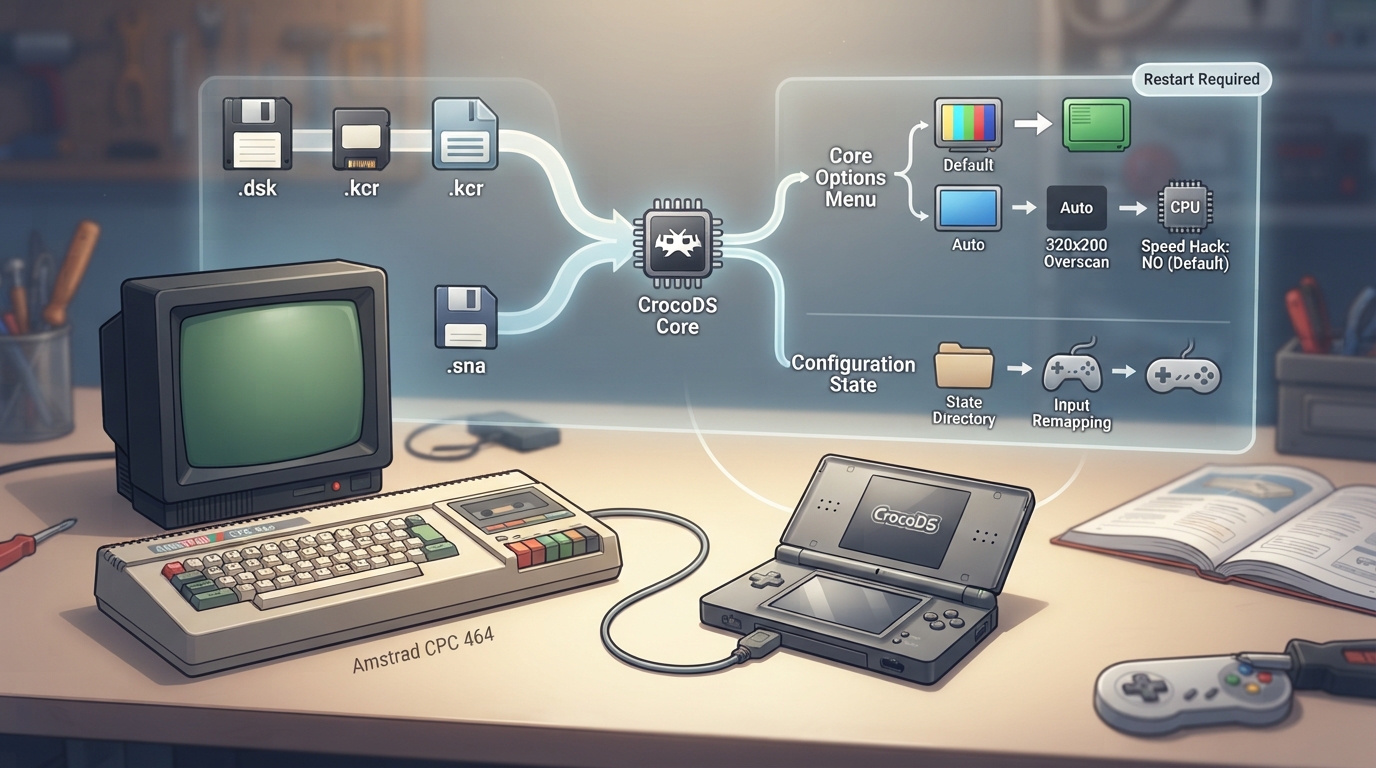
CrocoDS is a libretro core for emulating the Amstrad CPC. It is based on Win-CPC and was originally created as an Amstrad CPC emulator for the Nintendo DS before being ported to libretro. This guide summarizes what the official documentation states about the core's content support, options, controls, and behavior.
Core Details
The CrocoDS core was authored by RedBug and is licensed under the MIT license. Its internal core name is 'crocods'. It is associated with the Amstrad - CPC database in RetroArch.
Loading Content
- 1. Obtain Amstrad CPC content in a supported format from lawful sources.
- 2. In RetroArch, load the content through the standard content-loading menu, selecting the CrocoDS core.
- 3. The core accepts files with the following extensions: .dsk, .sna, and .kcr.
Core Options
The CrocoDS core exposes the following options in the core options menu. Default values are shown in bold in the official documentation and are listed as 'Default' below.
- - Color Monitor [crocods_greenmonitor]: color (default) or green.
- - Resize [crocods_resize]: Auto (default), 320x200, or Overscan.
- - Speed hack [crocods_hack]: no (default) or yes.
- Settings marked with (Restart) require the core to be closed for the new setting to apply on next launch.
Geometry and Timing
The core reports a provided FPS of 50, a sample rate of 44100 Hz, and an aspect ratio of 1.
State File Behavior
The CrocoDS core saves and loads state files to and from the frontend's State directory. State files use the naming pattern 'content-name'.state# , where # represents the state slot number.
Controllers
The CrocoDS core supports the following device types in the controls menu: None, RetroPad (Joypad, default for both users), and RetroKeyboard (Joypad with keyboard inputs always active and keymapper support).
Frontend Features
The core respects frontend-level settings for Restart, Screenshots, States, Rewind, Netplay, Core Options, Controls, and Remapping.
Features that are not supported include Saves, Memory Monitoring (achievements), RetroArch Cheats, Native Cheats, Multi-Mouse, Rumble, Sensors, Camera, Location, Subsystem, Softpatching, Disk Control, Username, Language, Crop Overscan, and LEDs.
Reference table · Scroll horizontally to see all columns.
| RetroPad Input | CrocoDS Core Input |
|---|---|
| B | JOY_FIRE2 |
| A | JOY_FIRE1 |
| Y | NIL |
| X | NIL |
| L1 | NIL |
| R1 | NIL |
| Select | SPARE |
| Start | RETURN |
| D-Pad Up | JOY_UP |
| D-Pad Down | JOY_DOWN |
| D-Pad Left | JOY_LEFT |
| D-Pad Right | JOY_RIGHT |
Reference table · Scroll horizontally to see all columns.
| RetroPad Input | CrocoDS Core Input |
|---|---|
| B | SPARE |
| A | SPARE |
| Y | NIL |
| X | NIL |
| L1 | NIL |
| R1 | NIL |
| Select | SPARE |
| Start | RETURN |
| D-Pad Up | CURSOR_UP |
| D-Pad Down | CURSOR_DOWN |
| D-Pad Left | CURSOR_LEFT |
| D-Pad Right | CURSOR_RIGHT |
Reference table · Scroll horizontally to see all columns.
| Option | Config Key | Possible Values | Default |
|---|---|---|---|
| Color Monitor | crocods_greenmonitor | color, green | color |
| Resize | crocods_resize | Auto, 320x200, Overscan | Auto |
| Speed hack | crocods_hack | no, yes | no |
Sources & references
Content responsibility: FrameTinker editorial desk. Source authors and software maintainers are credited separately below; this is not a claim of hands-on testing.
Published .
RetroArch: crocods — official gaming software documentation https://raw.githubusercontent.com/libretro/docs/master/docs/library/crocods.mdRetrieved Oct 12, 2026Something doesn’t match your setup?
Suggest a correction