

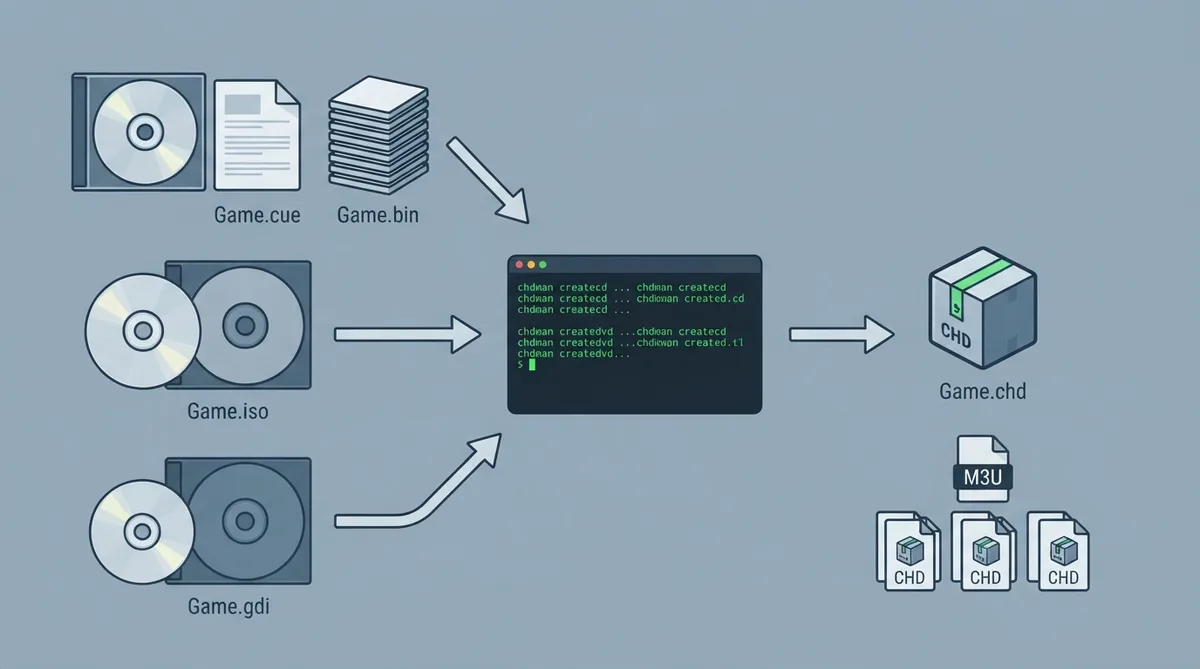
Games released on CD, GD-ROM or DVD are loaded from disc images in RetroArch. This guide covers the common image formats, how to compress them into CHD files, and how to keep multi-disc games together. It is based on the official RetroArch disc images documentation and has not been hands-on tested.
Load the CUE file, not the BIN
CUE/BIN is the most common CD format. The .bin files hold the data and audio tracks, while the small .cue file lists them. Always load the .cue file rather than a .bin file: without the cue sheet, the core does not know where the tracks are, and CD audio or whole games fail.
ISO and GDI formats
- ISO holds a single data track. It is fine for DVD games and data-only CDs, but it cannot hold CD audio tracks.
- GDI is the Dreamcast GD-ROM equivalent of a cue sheet and is loaded the same way.
- CHD stores any of the above, tracks included, as one compressed file.
Which formats a core accepts is listed under Extensions on its page in the core library, so check the relevant core page to confirm support.
CHD: one compressed file per disc
CHD, short for Compressed Hunks of Data, comes from MAME. A CHD is lossless: it holds the same tracks as the original image, usually in noticeably less space, and a multi-file CUE/BIN game becomes a single file.
CHD files are made with chdman, which ships with MAME. It is included in the MAME download for Windows and in the mame-tools package on most Linux distributions.
Use the matching create command for the type of image you are compressing, and make one CHD per disc.
To get the original image back, use chdman extractcd for CD images, or extractdvd for DVDs.
Multi-disc games and M3U files
A game on several discs is loaded through an .m3u file, a text file listing its discs one per line. Loading the .m3u makes all the discs available to RetroArch's disc control, keeps one set of saves for the whole game, and lets you switch discs from the Quick Menu.
List the files you would load for each disc: the .cue files for CUE/BIN, or the .chd files. The Disc Swapping documentation explains how to write the file and switch discs.
Multi-disc games in playlists
When a content scan (Import Content > Content Scan, called Manual Scan in older versions) finds .m3u files, RetroArch adds one entry for each .m3u, named after the game without its disc number, and leaves out the separate disc files the .m3u lists. Keep each game's .m3u in the scanned folder together with its discs, or anywhere the scan reaches, and the playlist shows one entry per game instead of one per disc.
Reference table · Scroll horizontally to see all columns.
| Source | Command |
|---|---|
| CD image (.cue, .gdi, or a CD .iso) | chdman createcd -i "Game.cue" -o "Game.chd" |
| DVD image (.iso), for example PlayStation 2 DVD games | chdman createdvd -i "Game.iso" -o "Game.chd" |
Sources & references
Published .
RetroArch: disc images — official gaming software documentation https://raw.githubusercontent.com/libretro/docs/master/docs/guides/disc-images.mdRetrieved Oct 8, 2026Something doesn’t match your setup?
Suggest a correction