

DOSBox is a multiplatform DOS emulator, and the libretro DOSBox core is authored by the DOSBox Team and licensed under GPLv2. This guide summarizes the official libretro documentation for the core: which file types it loads, how to generate and use config files, how to set up MIDI, and which core options are available.
Supported Content Formats
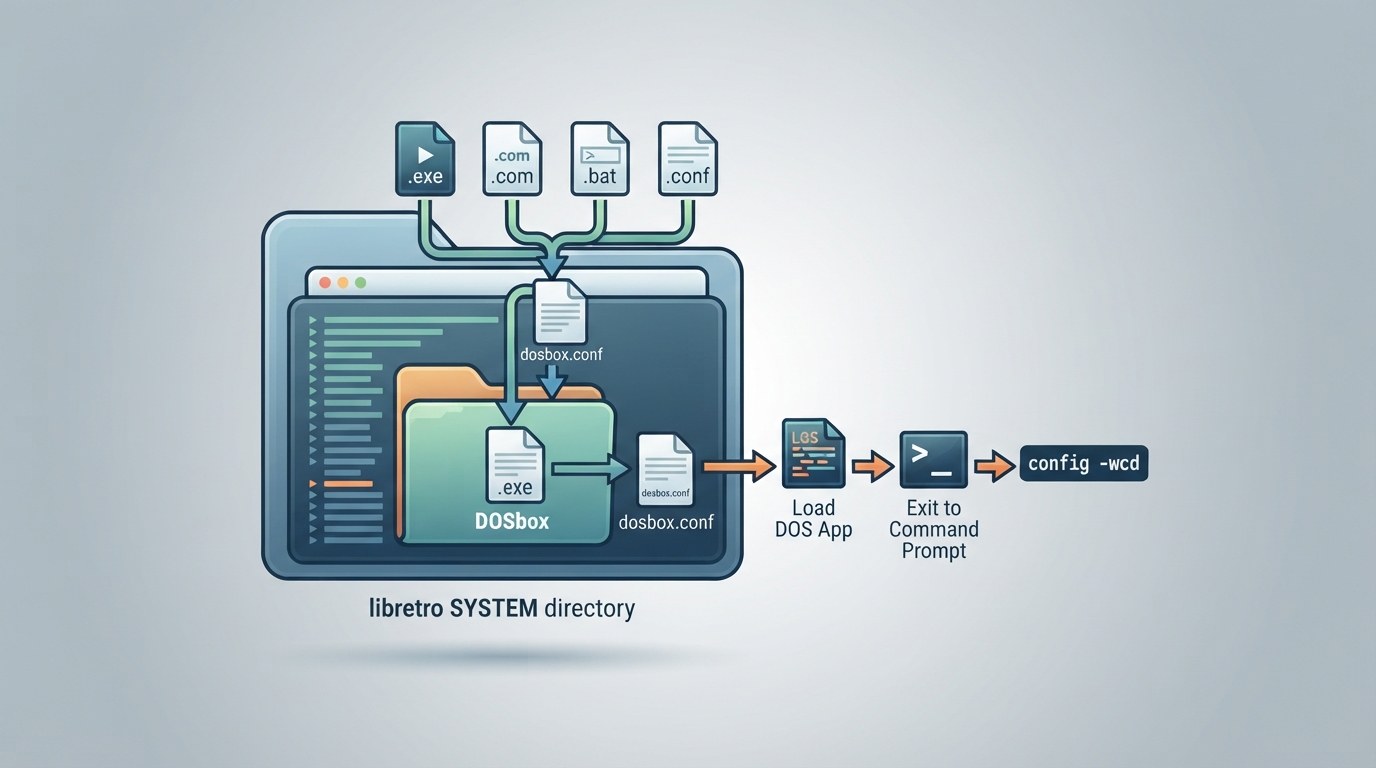
The DOSBox core can load content with the following file extensions: .exe, .com, .bat, and .conf. A DOS database is associated with the core.
Two Ways to Load Content
- 1. Loading an .exe, .com, or .bat file: the system directory is searched for a dosbox.conf file to load. If none is available, default values are used. This mode is equivalent to running a DOSBox binary with the specified file as the command line argument.
- 2. Loading a .conf file: DOSBox is loaded with the options in the config file. This mode is useful if you just want to be dropped at a command prompt, but it can also load a game by putting commands in the autoexec section.
For loading to be useful, the frontend needs keyboard and mouse support, and all keyboard shortcuts need to be remapped.
Generating a Config File
- 1. Create the DOSbox folder inside your libretro SYSTEM directory.
- 2. Load any DOS application.
- 3. Exit back to the command interpreter.
- 4. Run config -wcd.
Configuration files allow far better control than core options at this stage. According to the documentation, eventually every usable option will be exposed as a core option, but in the meantime combining both a config file and core options is described as the best alternative.
Autoexec Config Example
A generated default config is always loaded by default, but you can override it by saving custom settings, preferably in the game folder. The documentation gives this example config:
[autoexec]
@echo off
mount d "/storage/roms/dos/game"
d:
game.exe
You can store this config in the game folder (or any other directory) and load just the config instead of the exe file. Once you change a setting using the config command or via core options, you can update the config file by using config -wc.
MIDI Setup
To use MIDI, you need MT32_CONTROL.ROM and MT32_PCM.ROM in the system directory of RetroArch, then set the following:
[midi]
mpu401=intelligent
mididevice=mt32
Core Options
The core options below are shown in the core options menu. Defaults are bolded in the source documentation. The options under Enable advanced core-options are only shown when that option is enabled. CPU cycles are set as CPU cycles multiplied by the CPU cycle multiplier, plus CPU fine cycles multiplied by the CPU fine cycles multiplier in the advanced options.
Enable core-options (dosbox_use_options) controls whether the core options below are applied. Disable it to leave the settings to a loaded .conf file.
Controllers
The DOSBox core supports 6 ports. Ports 1 and 2 can be set to one of the following device types: Keyboard + Mouse, Gamepad, Joystick, or Disconnected. Ports 3 to 6 can be set to Keyboard + Mouse or Disconnected.
Keyboard Mapping Note
The documented keyboard mapping includes a notable swap: the RetroKeyboard Right input maps to the DOS Left arrow, and the RetroKeyboard Left input maps to the DOS Right arrow. Most other keys map directly, including letters, digits, function keys, and numpad inputs.
Reference table · Scroll horizontally to see all columns.
| Option | Setting key | Values (default in bold) |
|---|---|---|
| Enable core-options | dosbox_use_options | true | false |
| Enable advanced core-options | dosbox_adv_options | false | true |
| Emulated machine | dosbox_machine_type | svga_s3 | svga_et3000 | svga_et4000 | svga_paradise | vesa_nolfb | vesa_oldvbe | hercules | cga | tandy | pcjr | ega | vgaonly |
| Scaler | dosbox_scaler | none | normal2x | normal3x |
| Gamepad emulated mouse | dosbox_emulated_mouse | enable | disable |
| Gamepad emulated deadzone | dosbox_emulated_mouse_deadzone | 5% | 10% | 15% | 20% | 25% | 30% | 0% |
| CPU core | dosbox_cpu_core | auto | dynamic | normal | simple |
| CPU type | dosbox_cpu_type | auto | 386 | 386_slow | 486 | 486_slow | pentium_slow | 386_prefetch |
| CPU cycle mode | dosbox_cpu_cycles_mode | fixed |
| CPU cycle multiplier | dosbox_cpu_cycles_multiplier | 1000 | 10000 | 100000 | 100 |
| CPU cycles | dosbox_cpu_cycles | 1 | 2 | 3 | 4 | 5 | 6 | 7 | 8 | 9 |
| CPU fine cycles multiplier (advanced) | dosbox_cpu_cycles_multiplier_fine | 100 | 1 | 10 |
| CPU fine cycles (advanced) | dosbox_cpu_cycles_fine | 1 | 2 | 3 | 4 | 5 | 6 | 7 | 9 |
| Sound Blaster type | dosbox_sblaster_type | sb16 | sb1 | sb2 | sbpro1 | sbpro2 | gb | none |
| Sound Blaster base address (advanced) | dosbox_sblaster_base | 220 | 240 | 260 | 280 | 2a0 | 2c0 | 2e0 | 300 |
| Sound Blaster IRQ (advanced) | dosbox_sblaster_irq | 5 | 7 | 9 | 10 | 11 | 12 | 3 |
| Sound Blaster DMA (advanced) | dosbox_sblaster_dma | 1 | 3 | 5 | 6 | 7 | 0 |
| Sound Blaster High DMA (advanced) | dosbox_sblaster_hdma | 7 | 0 | 1 | 3 | 5 | 6 |
| Sound Blaster OPL Mode (advanced) | dosbox_sblaster_opl_mode | auto | cms | op12 | dualop12 | op13 | op13gold | none |
| Sound Blaster OPL Provider (advanced) | dosbox_sblaster_opl_emu | default | compat | fast | mame |
| Enable PC-Speaker | dosbox_pcspeaker | false | true |
| Enable Tandy Sound System (advanced) | dosbox_tandy | auto | on | off |
| Enable Disney Sound Source (advanced) | dosbox_disney | false | true |
| Enable IPX over UDP | dosbox_ipx | false | true |
Reference table · Scroll horizontally to see all columns.
| Frontend-level feature | Supported |
|---|---|
| Restart | Yes |
| Screenshots | Yes |
| Saves | - |
| States | No |
| Rewind | No |
| Netplay | No |
| Core Options | Yes |
| Memory Monitoring (achievements) | No |
| RetroArch Cheats | No |
| Native Cheats | No |
| Controls | Yes |
| Remapping | Yes |
| Multi-Mouse | No |
| Rumble | No |
| Sensors | No |
| Camera | No |
| Location | No |
| Subsystem | No |
| Softpatching | No |
| Disk Control | No |
| Username | No |
| Language | No |
| Crop Overscan | No |
| LEDs | No |
Reference table · Scroll horizontally to see all columns.
| Property | Value |
|---|---|
| Core provided FPS | 60.0 |
| Core provided sample rate | (Rate) |
| Base width | 320 |
| Base height | 200 |
| Max width | 1024 |
| Max height | 768 |
| Core provided aspect ratio | 4/3 |
Reference table · Scroll horizontally to see all columns.
| Control type | Input descriptor | RetroPad input |
|---|---|---|
| Gamepad 2 Button | Button 2 | B |
| Gamepad 2 Button | Button 1 | Y |
| Gamepad 2 Button | D-Pad Up / Down / Left / Right | D-Pad Up / Down / Left / Right |
| Gamepad 4 Button | Button 3 | B |
| Gamepad 4 Button | Button 1 | Y |
| Gamepad 4 Button | Button 4 | A |
| Gamepad 4 Button | Button 2 | X |
| Joystick 2 Button | Button 2 | B |
| Joystick 2 Button | Button 1 | Y |
| Joystick 2 Button | Left Analog X / Y | Left Stick X / Y |
| Joystick 4 Button | Button 3 | B |
| Joystick 4 Button | Button 1 | Y |
| Joystick 4 Button | Button 4 | A |
| Joystick 4 Button | Button 2 | X |
| Joystick 4 Button | Left / Right Analog X / Y | Left / Right Stick X / Y |
| Keyboard | Esc | Select |
| Keyboard | Enter | Start |
| Keyboard | Kbd Up / Down / Left / Right | D-Pad Up / Down / Left / Right |
| Emulated mouse | Emulated Mouse Right Click | L2 |
| Emulated mouse | Emulated Mouse Left Click | R2 |
| Emulated mouse | Emulated Mouse X / Y Axis | Right Stick X / Y |
Sources & references
Content responsibility: FrameTinker editorial desk. Source authors and software maintainers are credited separately below; this is not a claim of hands-on testing.
Published .
RetroArch: dosbox — official gaming software documentation https://raw.githubusercontent.com/libretro/docs/master/docs/library/dosbox.mdRetrieved Oct 12, 2026Something doesn’t match your setup?
Suggest a correction