

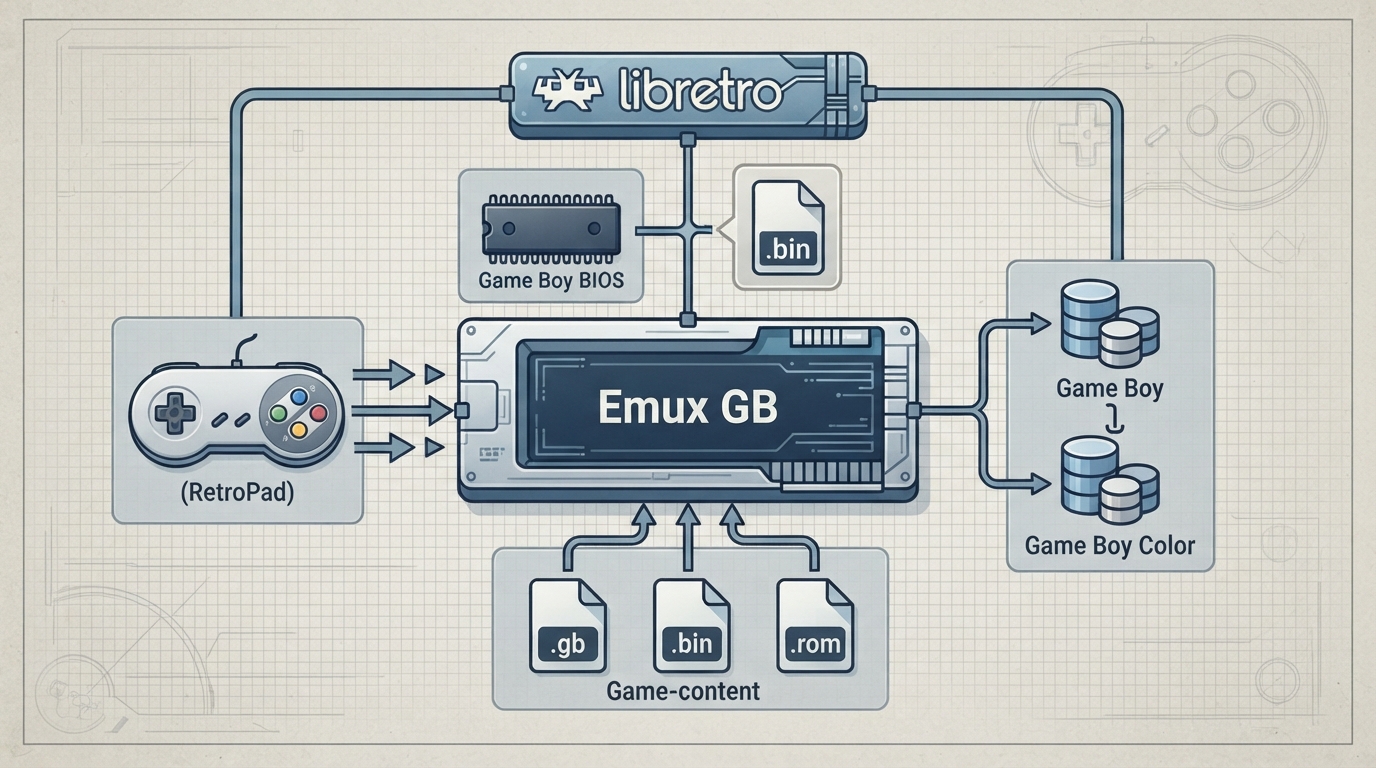
Emux GB is a libretro core for the Emux emulator project. Emux is described as a cross-platform emulator project that aims to emulate multiple kinds of gaming-related machines, with a design philosophy inspired by the Linux kernel: CPUs and controllers are kept separate from machines so drivers stay platform-independent.
Core facts
The Emux GB core is authored by Sebastien Ronsse and is licensed under GPLv2.
Step 1: Check that your content uses a supported extension
The Emux GB core documents the following file extensions for content it can load:
- .gb
- .bin
- .rom
If your content file uses a different extension, the core does not document support for it here. Only use content files you are legally entitled to run; this guide does not cover game downloads.
Step 2: Match the core to the right RetroArch database
RetroArch databases associated with the Emux GB core are:
- Nintendo - Game Boy
- Nintendo - Game Boy Color
Step 3: Supply the required boot ROM in the system directory
Required or optional firmware files go in RetroArch's system directory. For Emux GB, the documented firmware entry is dmg_boot.bin, described as the Game Boy Boot ROM, and it is listed as required. Its documented md5sum is 32fbbd84168d3482956eb3c5051637f5.
Supported RetroArch features
The documentation states that the Emux GB core supports Restart, Screenshots, and Controls at the RetroArch level. Other documented entries such as Saves, States, Rewind, Netplay, Core Options, Memory Monitoring (achievements), RetroArch Cheats, Native Cheats, Remapping, Multi-Mouse, Rumble, Sensors, Camera, Location, Subsystem, Softpatching, Disk Control, Username, Language, and Crop Overscan are marked as not supported. Because saves and save states are documented as unsupported, plan around that limitation rather than assuming in-session progress is persistent.
Device types and default input
The controls menu documents device types None, RetroPad, and RetroPad w/Analog, with RetroPad bolded as the default for user 1. The documentation notes there is no reason to switch to RetroPad w/Analog.
User 1 input descriptors
- B -> retro_b
- Select -> retro_select
- Start -> retro_start
- D-Pad Up -> retro_dpad_up
- D-Pad Down -> retro_dpad_down
- D-Pad Left -> retro_dpad_left
- D-Pad Right -> retro_dpad_right
- A -> retro_a
Core directory name
The documentation lists the Emux GB core's directory name as 'emux (gb)'.
Documentation gaps to be aware of
The source page is marked WIP. Its Compatibility section is left as 'Awaiting description,' and the internal FPS, internal sample rate, and core provided aspect ratio values are placeholders rather than actual figures. No compatibility list, per-game results, or timing values are documented here, so this guide cannot state which titles run well or how the core performs.
Reference table · Scroll horizontally to see all columns.
| Feature | Supported |
|---|---|
| Restart | Yes |
| Screenshots | Yes |
| Controls | Yes |
| Saves | No |
| States | No |
| Rewind | No |
| Netplay | No |
| Core Options | No |
| Memory Monitoring (achievements) | No |
| RetroArch Cheats | No |
| Native Cheats | No |
| Remapping | No |
| Multi-Mouse | No |
| Rumble | No |
| Sensors | No |
| Camera | No |
| Location | No |
| Subsystem | No |
| Softpatching | No |
| Disk Control | No |
| Username | No |
| Language | No |
| Crop Overscan | No |
Reference table · Scroll horizontally to see all columns.
| Filename | Description | md5sum |
|---|---|---|
| dmg_boot.bin | Game Boy Boot ROM - Required | 32fbbd84168d3482956eb3c5051637f5 |
Sources & references
Content responsibility: FrameTinker editorial desk. Source authors and software maintainers are credited separately below; this is not a claim of hands-on testing.
Published .
RetroArch: emux gb — official gaming software documentation https://raw.githubusercontent.com/libretro/docs/master/docs/library/emux_gb.mdRetrieved Oct 12, 2026Something doesn’t match your setup?
Suggest a correction