

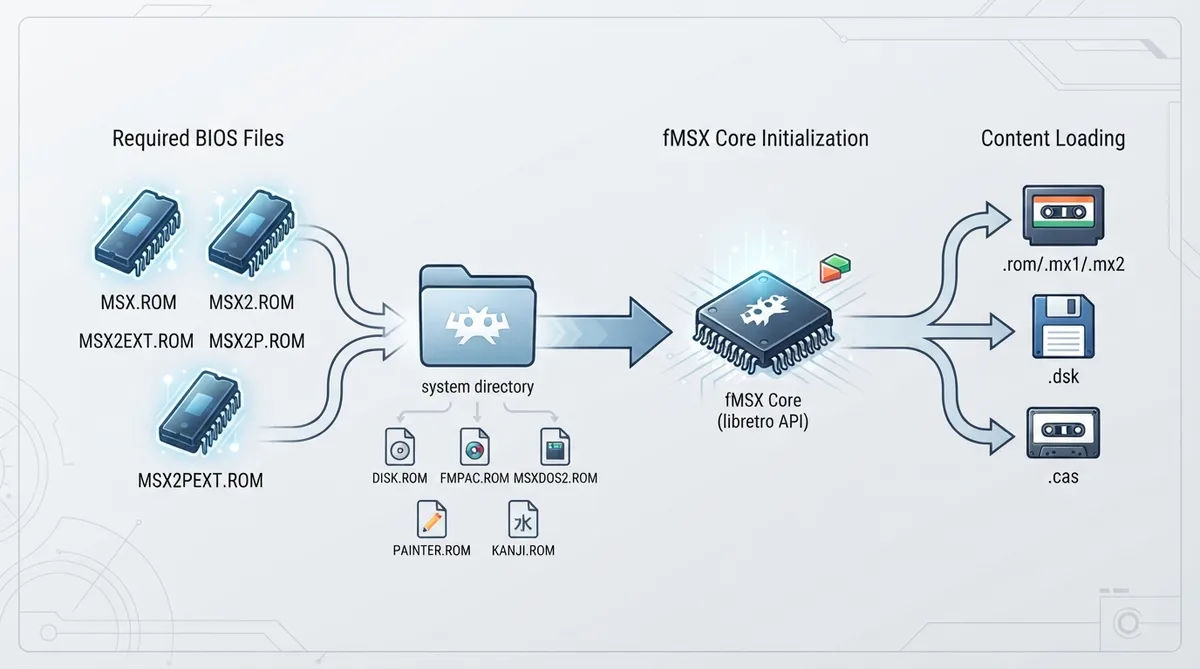
The fMSX core for RetroArch is a port of Marat Fayzullin's fMSX 6.0 (21-Feb-2021) to the libretro API. It emulates MSX, MSX2 and MSX2+ 8-bit home computers. The core is authored by Marat Fayzullin and is licensed under a non-commercial license.
Prerequisites
- A RetroArch installation with the fMSX core available.
- MSX, MSX2 or MSX2+ content in a supported file format.
- The required BIOS files placed in RetroArch's system directory.
Supported content file extensions
Content loadable by the fMSX core uses the following file extensions: .rom, .mx1, .mx2, .dsk and .cas.
BIOS files
Required or optional firmware files go in RetroArch's system directory. The documentation lists the following example filenames together with their MD5 checksums. The five required files are MSX.ROM, MSX2.ROM, MSX2EXT.ROM, MSX2P.ROM and MSX2PEXT.ROM, which correspond to the MSX, MSX2, MSX2 ExtROM, MSX2+ and MSX2+ ExtROM BIOS images. The optional files DISK.ROM, FMPAC.ROM, MSXDOS2.ROM, PAINTER.ROM and KANJI.ROM provide DiskROM/BDOS, FMPAC BIOS, MSX-DOS 2, Yamaha Painter and Kanji font support respectively.
Setting up the core
- Place the required BIOS files (MSX.ROM, MSX2.ROM, MSX2EXT.ROM, MSX2P.ROM, MSX2PEXT.ROM) in RetroArch's system directory.
- Optionally add the optional BIOS files DISK.ROM, FMPAC.ROM, MSXDOS2.ROM, PAINTER.ROM and KANJI.ROM for features such as disk support, FMPAC sound, MSX-DOS 2, Yamaha Painter and Kanji font support.
- Load your MSX, MSX2 or MSX2+ content file through RetroArch's normal content loading workflow.
- Open the core options menu to select the MSX model.
- Configure the control device type for User 1 as None, Joystick, Joystick + Emulated Keyboard, Emulated Keyboard or Keyboard.
- Configure the User 2 device type as either None or Joystick.
Core options
The fMSX core exposes options that can be changed from the core options menu. MSX Mode selects the MSX model and supports MSX2+ (the default), MSX1 and MSX2. The documentation also lists options labeled MSX Video Mode, MSX Mapper Type Mode, MSX Main Memory and MSX Video Memory, but does not describe how they behave.
Controllers
User 1 can be configured as None, Joystick (default), Joystick + Emulated Keyboard, Emulated Keyboard or Keyboard. The Keyboard device type has keymapper support. User 2 can be configured as None or Joystick. Joystick mappings bind the RetroPad face and directional inputs to MSX fire and stick directions, while Joystick + Emulated Keyboard additionally maps buttons to keys such as Spacebar, F1 to F5, Graph, Ctrl, Enter and Escape.
Feature support
The core supports restart, screenshots, save states, rewind, netplay, core options, memory monitoring for achievements, RetroArch cheats, native cheats, controls, remapping and disk control. Saves, multi-mouse, rumble, sensors, camera, location, subsystem, softpatching, username, language and crop overscan are not supported.
Recovery notes
If a core option marked with (Restart) is changed, the core must be closed and the content relaunched for the new setting to take effect. The documentation does not mark the listed fMSX core options with this flag.
Reference table · Scroll horizontally to see all columns.
| Filename | Description | MD5 checksum |
|---|---|---|
| MSX.ROM | MSX BIOS - Required | 364a1a579fe5cb8dba54519bcfcdac0d |
| MSX2.ROM | MSX2 BIOS - Required | ec3a01c91f24fbddcbcab0ad301bc9ef |
| MSX2EXT.ROM | MSX2 ExtROM - Required | 2183c2aff17cf4297bdb496de78c2e8a |
| MSX2P.ROM | MSX2+ BIOS - Required | 847cc025ffae665487940ff2639540e5 |
| MSX2PEXT.ROM | MSX2+ ExtROM - Required | 7c8243c71d8f143b2531f01afa6a05dc |
| DISK.ROM | DiskROM/BDOS (optional) | 80dcd1ad1a4cf65d64b7ba10504e8190 |
| FMPAC.ROM | FMPAC BIOS (optional) | 6f69cc8b5ed761b03afd78000dfb0e19 |
| MSXDOS2.ROM | MSX-DOS 2 (optional) | 6418d091cd6907bbcf940324339e43bb |
| PAINTER.ROM | Yamaha Painter (optional) | 403cdea1cbd2bb24fae506941f8f655e |
| KANJI.ROM | Kanji Font (optional) | febe8782b466d7c3b16de6d104826b34 |
Reference table · Scroll horizontally to see all columns.
| Feature | Supported |
|---|---|
| Restart | Yes |
| Screenshots | Yes |
| Saves | No |
| States | Yes |
| Rewind | Yes |
| Netplay | Yes |
| Core Options | Yes |
| Memory Monitoring (achievements) | Yes |
| RetroArch Cheats | Yes |
| Native Cheats | Yes |
| Controls | Yes |
| Remapping | Yes |
| Multi-Mouse | No |
| Rumble | No |
| Sensors | No |
| Camera | No |
| Location | No |
| Subsystem | No |
| Softpatching | No |
| Disk Control | Yes |
| Username | No |
| Language | No |
| Crop Overscan | No |
Sources & references
Content responsibility: FrameTinker editorial desk. Source authors and software maintainers are credited separately below; this is not a claim of hands-on testing.
Published .
RetroArch: fmsx — official gaming software documentation https://raw.githubusercontent.com/libretro/docs/master/docs/library/fmsx.mdRetrieved Oct 13, 2026Something doesn’t match your setup?
Suggest a correction