

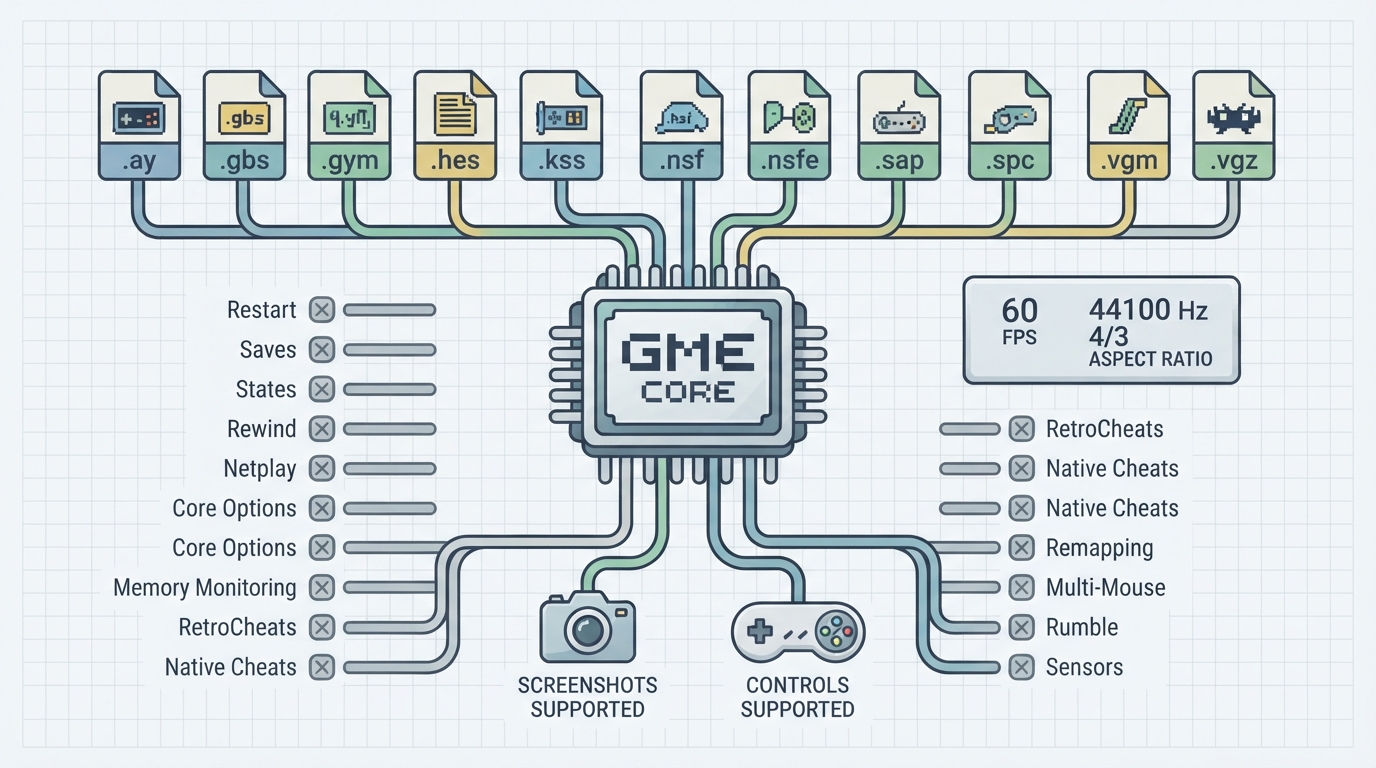
Game Music Emu is a multi-purpose video game console music player, distributed as a libretro core for RetroArch. This guide summarizes what the official documentation states about the core: which music file formats it can load, which RetroArch frontend features it respects, its timing values, and how its controls are mapped. The documentation does not cover installation or setup procedures, so those steps are not included here.
Music formats the core can load
The documentation lists eleven file extensions for content that the Game Music Emu core can load. All are chiptune and console-music formats rather than general-purpose audio containers.
- .ay
- .gbs
- .gym
- .hes
- .kss
- .nsf
- .nsfe
- .sap
- .spc
- .vgm
- .vgz
Frontend features the core respects
The documentation includes a feature table covering frontend-level settings and features. Only two entries are marked as supported: Screenshots and Controls. Every other listed feature is marked as not supported, including Restart, Saves, States, Rewind, Netplay, Core Options, Memory Monitoring, RetroArch Cheats, Native Cheats, Remapping, Multi-Mouse, Rumble and Sensors.
Documented core timing values
The documentation states that the core provides 60 FPS, a 44100 Hz sample rate, and a 4/3 aspect ratio. It also notes that the core's internal core name is 'Game Music Emulator'.
Controller inputs and mappings
The core supports three User 1 device types in the controls menu: None (described as not disabling input), RetroPad (the default, with the documentation advising users to stay on it), and RetroPad with Analog, which the documentation says offers no reason to switch to. The joypad input table maps three RetroPad inputs to three core inputs.
- RetroPad Start maps to Pause.
- RetroPad L1 maps to Previous Track.
- RetroPad R1 maps to Next Track.
Author and license
What the documentation does not cover
The official page does not describe installation steps, core option values, configuration changes, or troubleshooting procedures, and it does not state system requirements. This guide therefore does not present those items. Source files for content playback are also not provided or discussed here.
Reference table · Scroll horizontally to see all columns.
| File extension |
|---|
| .ay |
| .gbs |
| .gym |
| .hes |
| .kss |
| .nsf |
| .nsfe |
| .sap |
| .spc |
| .vgm |
| .vgz |
Reference table · Scroll horizontally to see all columns.
| Feature | Supported |
|---|---|
| Restart | No |
| Screenshots | Yes |
| Saves | No |
| States | No |
| Rewind | No |
| Netplay | No |
| Core Options | No |
| Memory Monitoring | No |
| RetroArch Cheats | No |
| Native Cheats | No |
| Controls | Yes |
| Remapping | No |
| Multi-Mouse | No |
| Rumble | No |
| Sensors | No |
Reference table · Scroll horizontally to see all columns.
| RetroPad input | Game Music Emu core input |
|---|---|
| Start | Pause |
| L1 | Previous Track |
| R1 | Next Track |
Sources & references
Content responsibility: FrameTinker editorial desk. Source authors and software maintainers are credited separately below; this is not a claim of hands-on testing.
Published .
RetroArch: game music emu — official gaming software documentation https://raw.githubusercontent.com/libretro/docs/master/docs/library/game_music_emu.mdRetrieved Oct 13, 2026Something doesn’t match your setup?
Suggest a correction