

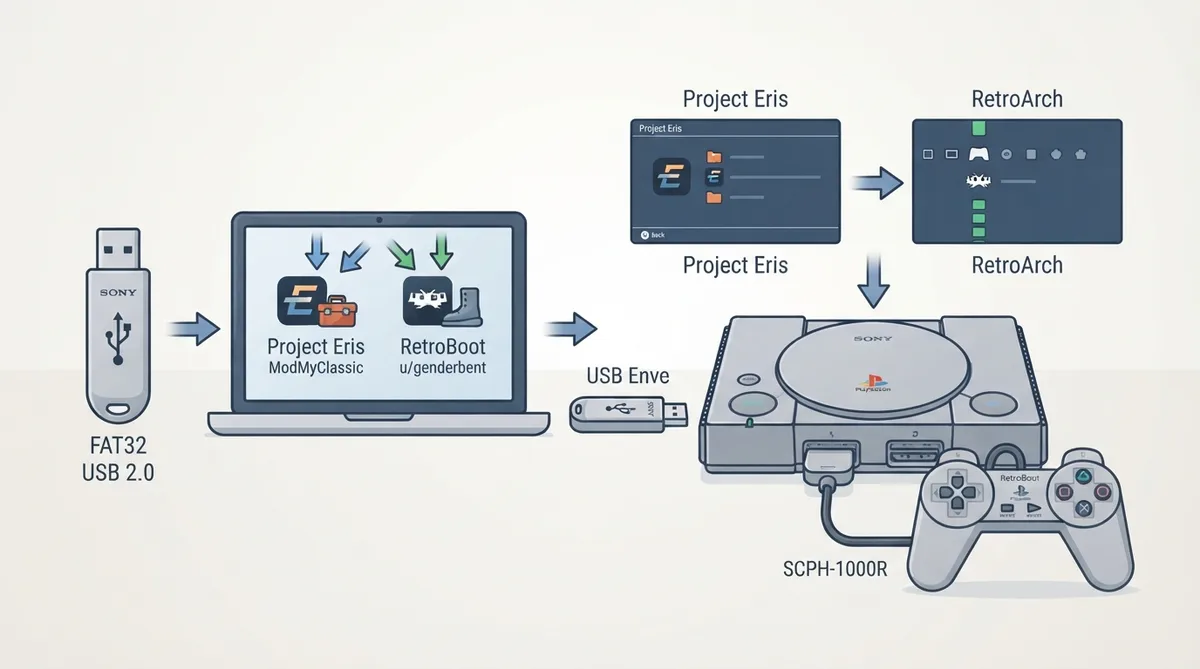
This guide summarizes the official libretro documentation page for downloading and installing RetroArch on the PlayStation Classic. It covers the stated prerequisites, the two community packages referenced by the documentation, and the installation sequence. The instructions below are reproduced from that documentation and have not been hands-on tested for this article.
Prerequisites
The documentation states that a way to execute homebrew is currently required to run RetroArch on the PlayStation Classic.
- USB drive formatted as FAT32 or exFAT, USB 2.0 (the documentation notes some USB 3.0 drives also work); USB drive renamed to "SONY"; a way to execute homebrew on the console.
The two community packages
The documentation notes that Project Eris is made by ModMyClassic and RetroBoot is made by u/genderbent, and treats both as valued community works for the PlayStation Classic. The two versions may contain different contents from each other: Project Eris is described as focused on the Ultimate PlayStation Classic, while RetroBoot runs RetroArch directly.
For Project Eris, the ModMyClassic website offers a bundle containing RetroArch, all the supported cores, and all the assets. The documentation notes that several download options are available and suggests selecting the Full Package in most cases.
For RetroBoot, the documentation points to u/genderbent's release post on the r/PlaystationClassic subreddit for more details. That post is linked in the structured resources below.
Installation sequence
- Format the USB drive to exFAT or FAT32; rename the USB drive to SONY; transfer all files from the package to the USB drive; fully power off the console and remove the power cable; plug the USB drive into the second port, or use an OTG cable and plug into the power socket; plug the power cable back in — the Power LED should turn amber; press the power button; follow the on-screen instructions if you use Project Eris, while RetroBoot boots directly into RetroArch.
Known limitations and unknowns
The documentation itself warns that installation steps or downloaded file parts of the project may differ over time. Version numbers, the exact core contents, and detailed troubleshooting steps are not specified in the source. No hands-on verification of these instructions was performed for this article.
Sources & references
Published .
RetroArch: install psc — official gaming software documentation https://raw.githubusercontent.com/libretro/docs/master/docs/guides/install-psc.mdRetrieved Oct 8, 2026Something doesn’t match your setup?
Suggest a correction