

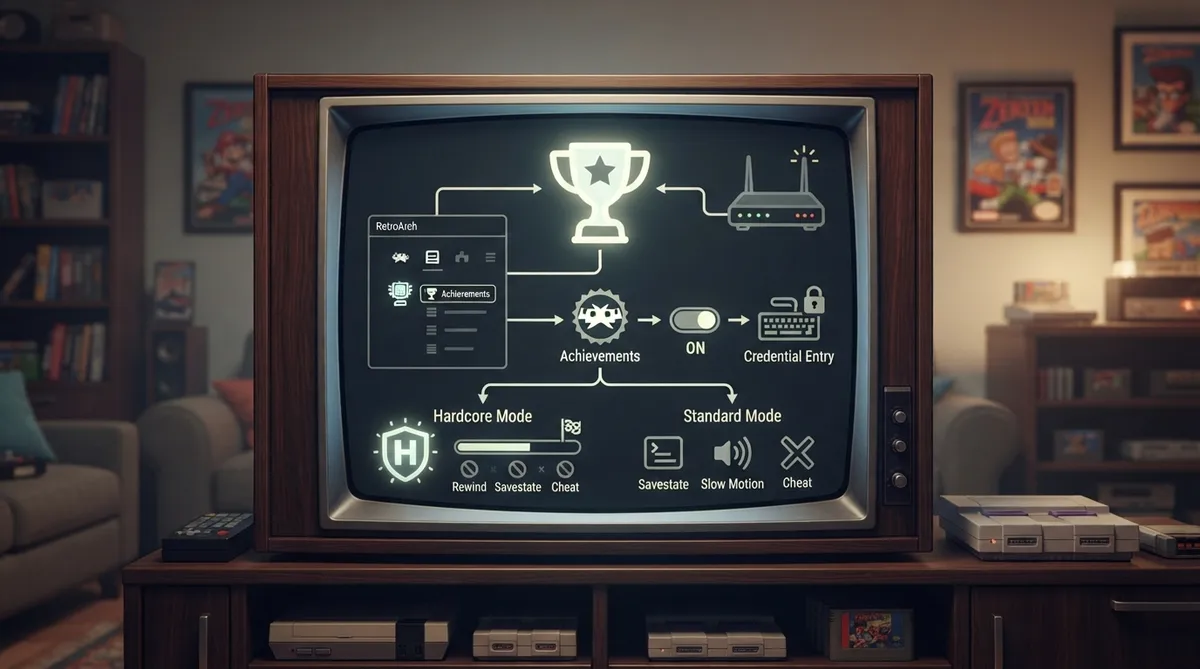
RetroAchievements is a service that provides a trophy and achievement unlocking mechanism similar to modern consoles, but for retro games. The service is not maintained by RetroArch or the Libretro team. This guide summarizes the official Libretro documentation page on the feature.
Before you start
- An account on retroachievements.org, confirmed through the verification email sent to you.
- An active internet connection.
- The latest version of RetroArch and the cores you use, which the documentation recommends for better compatibility with the feature.
Setting up achievements in RetroArch
Setup is handled entirely from RetroArch's own menu. After registering and confirming the account, the documented procedure is to open RetroArch, go to Settings > Achievements, enable the functionality, and fill in your RetroAchievements credentials. A quick-reference table below maps each task to its menu location.
The hardcore mode trade-off
Hardcore mode is a deliberate trade of convenience for status. You give up savestates, slow motion, and cheats, so progress must survive without save-state rewinds or cheat codes. In return, your play is tracked on a separate leaderboard and you can take part in site events. Players who want quick undos can play outside hardcore mode; those chasing leaderboard placement should assume hardcore rules from the first session.
Core compatibility
For the list of supported cores, consult the Emulator Support page on the RetroAchievements documentation site. Cores that are not listed as supported are likely to have issues with achievement logic, and tickets from players using those cores can be closed without investigation.
Troubleshooting common problems
If RetroAchievements worked previously but you now see a login failure without changing anything, your login token may have expired. The fix documented is to generate a new one by clearing out your login information in Settings > User > Accounts > RetroAchievements and re-entering it.
If you met the requirement for an achievement but it was not awarded, note that while offline the awarded achievement status is cached and will be awarded once you reconnect to the internet. This only applies to the current session, so avoid quitting RetroArch before reconnecting. If you had a working internet connection and the achievement still does not trigger, make sure you are using an officially supported core before requesting support.
Reference table · Scroll horizontally to see all columns.
| Task | Where in RetroArch |
|---|---|
| Enable achievements | Settings > Achievements |
| Enter or renew credentials | Settings > User > Accounts > RetroAchievements |
Sources & references
Content responsibility: FrameTinker editorial desk. Source authors and software maintainers are credited separately below; this is not a claim of hands-on testing.
Published .
RetroArch: retroachievements — official gaming software documentation https://raw.githubusercontent.com/libretro/docs/master/docs/guides/retroachievements.mdRetrieved Oct 8, 2026Something doesn’t match your setup?
Suggest a correction