

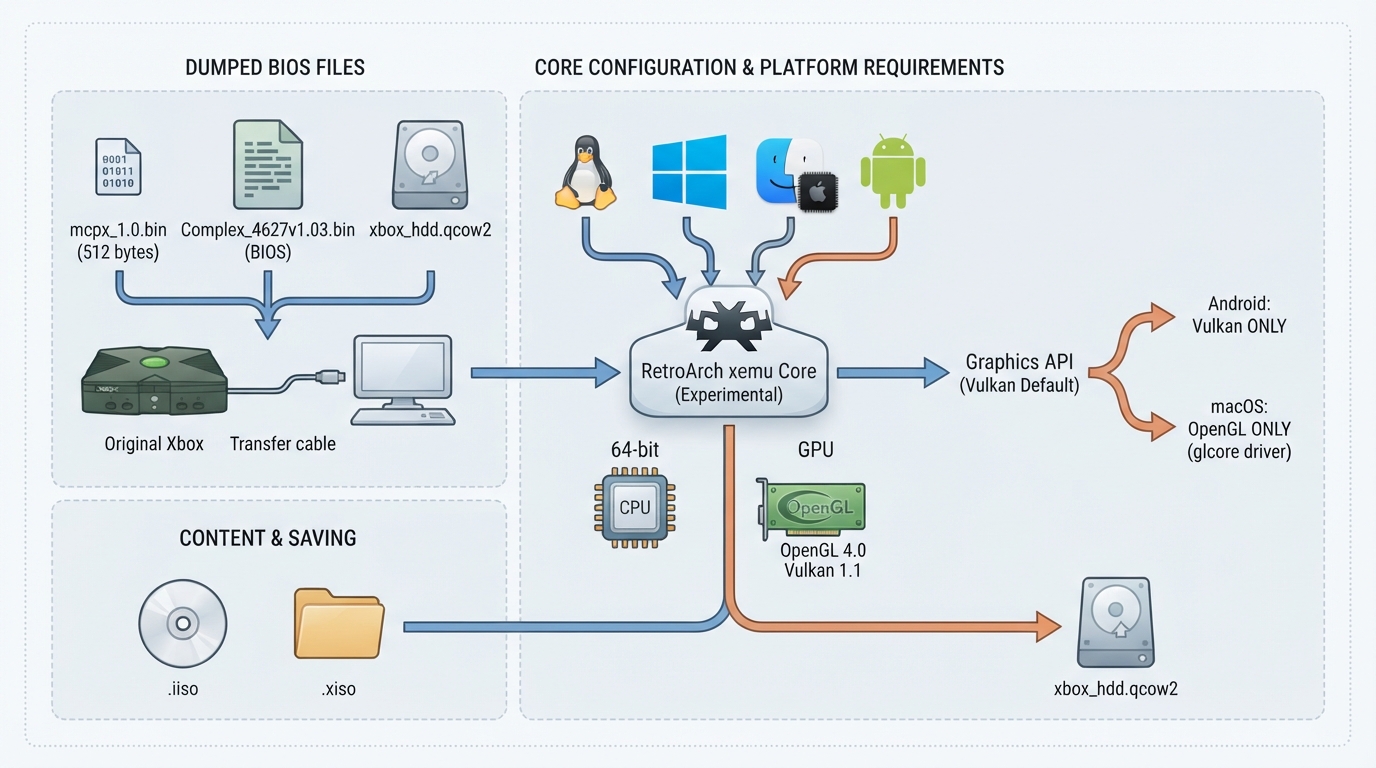
The xemu libretro core is a port of xemu, the original Xbox emulator, to RetroArch. The emulator itself is upstream's: the core follows the xemu-project/xemu repository and reports upstream's version number. The documentation describes the core as experimental. This guide summarizes the official documentation; it is not based on hands-on testing.
Supported platforms
The core is built for Linux (x86_64 and arm64), Windows (x64), macOS (Apple Silicon and Intel), and Android (arm64-v8a and x86_64).
Hardware and graphics requirements
The documented requirements are a 64-bit CPU and a GPU that supports OpenGL 4.0 (core profile) or Vulkan 1.1. The Graphics API core option selects the renderer, and Vulkan is the default. Changing that option only takes effect after RetroArch is restarted.
- Platform-specific renderer behavior: On Android the core renders with Vulkan only. On macOS it renders with OpenGL only, because MoltenVK lacks the geometry shaders xemu's Vulkan renderer needs; use RetroArch's glcore video driver there.
Required files
- The documentation marks these files as required: mcpx_1.0.bin, the MCPX boot ROM (512 bytes), whose listed md5sum is d49c52a4102f6df7bcf8d0617ac475ed; Complex_4627v1.03.bin, the Flash ROM (BIOS), 1 MB or 256 KB; and xbox_hdd.qcow2, the hard disk image. xbox_eeprom.bin is an optional EEPROM file.
The boot ROM and the BIOS are Microsoft's, and according to the documentation they have to be dumped from your own console; the documentation points to xemu's required files page for details. The xemu project publishes a ready-made hard disk image as xemu-hdd-image.
Content formats
The documented content extensions are .iso and .xiso.
How saving works
Games save to the emulated console's hard disk inside xbox_hdd.qcow2, not to RetroArch save files. Save states are not supported.
Supported and unsupported features
- Documented as supported: Restart, Screenshots, Core Options, Controls, Remapping, and Rumble.
- Documented as not supported: Saves, States, Rewind, Netplay, Memory Monitoring for achievements, RetroArch Cheats, Native Cheats, and Multi-Mouse.
Core options mentioned in the documentation
- System Memory (MB) [xemu_memory]: 64 MB (default) or 128 MB. Network Backend [xemu_network_backend]: Disabled (default) or NAT. Skip Boot Animation [xemu_skip_boot_anim]: Disabled (default) or Enabled. Graphics API: picks the renderer, Vulkan by default, effective after a RetroArch restart.
Reference table · Scroll horizontally to see all columns.
| Platform | Documented renderer behavior |
|---|---|
| Android | Vulkan only |
| macOS | OpenGL only; use the glcore video driver (MoltenVK lacks required geometry shaders) |
| Other documented builds (Linux, Windows) | Graphics API option selects the renderer; Vulkan is the default; restart RetroArch for changes to take effect |
Reference table · Scroll horizontally to see all columns.
| Filename | Description | Status |
|---|---|---|
| mcpx_1.0.bin | MCPX boot ROM, 512 bytes; md5sum d49c52a4102f6df7bcf8d0617ac475ed | Required |
| Complex_4627v1.03.bin | Flash ROM (BIOS), 1 MB or 256 KB | Required |
| xbox_hdd.qcow2 | Hard disk image | Required |
| xbox_eeprom.bin | EEPROM | Optional |
Reference table · Scroll horizontally to see all columns.
| Option | Values |
|---|---|
| Graphics API | Renderer selection; Vulkan by default; takes effect after RetroArch restart |
| System Memory (MB) [xemu_memory] | 64 MB (default) | 128 MB |
| Network Backend [xemu_network_backend] | Disabled (default) | NAT |
| Skip Boot Animation [xemu_skip_boot_anim] | Disabled (default) | Enabled |
Reference table · Scroll horizontally to see all columns.
| Feature | Supported |
|---|---|
| Restart | Yes |
| Screenshots | Yes |
| Core Options | Yes |
| Controls | Yes |
| Remapping | Yes |
| Rumble | Yes |
| Saves | No |
| States | No |
| Rewind | No |
| Netplay | No |
| Memory Monitoring (achievements) | No |
| RetroArch Cheats | No |
| Native Cheats | No |
| Multi-Mouse | No |
Sources & references
Content responsibility: FrameTinker editorial desk. Source authors and software maintainers are credited separately below; this is not a claim of hands-on testing.
Published .
RetroArch: xemu — official gaming software documentation https://raw.githubusercontent.com/libretro/docs/master/docs/library/xemu.mdRetrieved Oct 15, 2026Something doesn’t match your setup?
Suggest a correction