

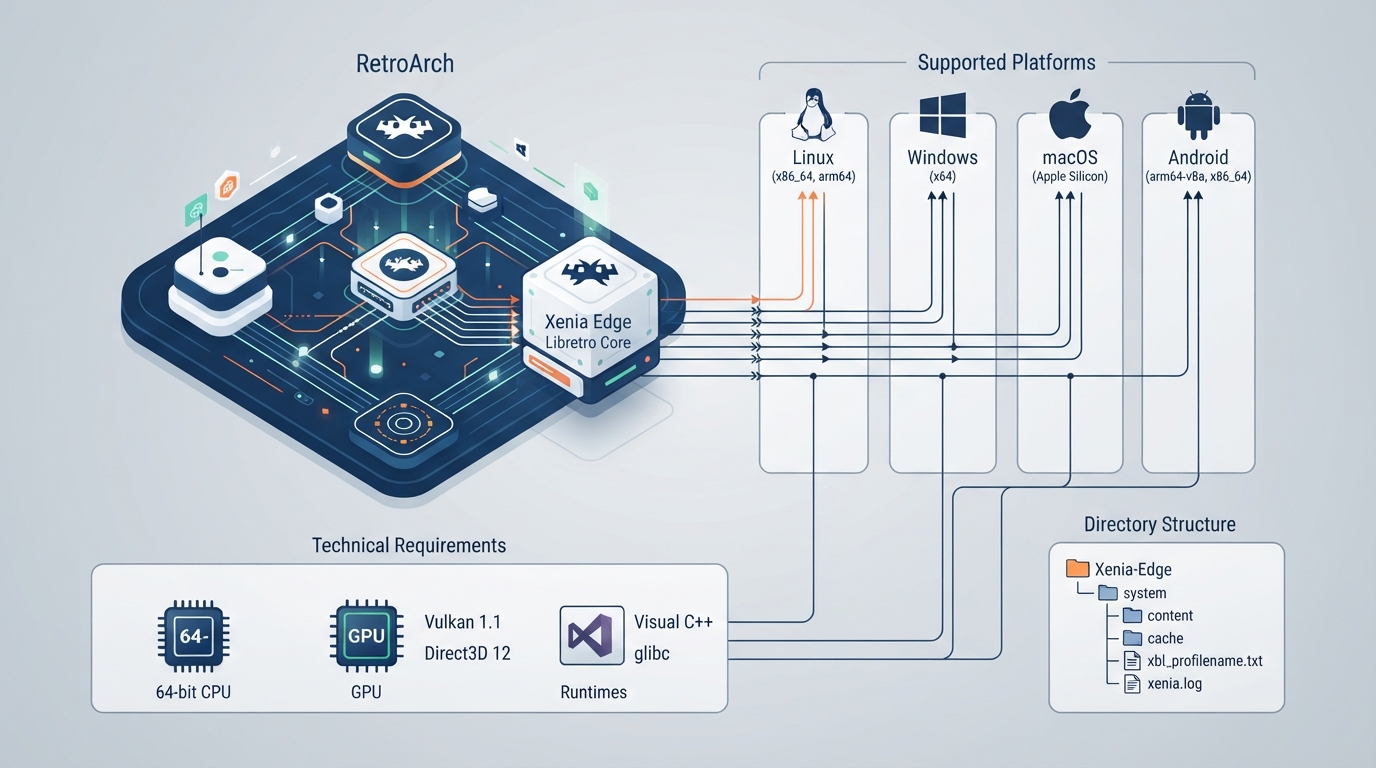
Xenia Edge is a port of the upstream Xenia Edge Xbox 360 emulator to the libretro API, usable as a RetroArch core. The emulator is upstream's, and the core follows xenia-edge and reports the upstream version. The project documentation describes the core as experimental.
Supported platforms
Builds are provided for Linux (x86_64, arm64), Windows (x64), macOS (Apple Silicon), and Android (arm64-v8a, x86_64). There is no build for Intel Macs: the x64 CPU backend needs address space below 4 GB, which a core loaded into a frontend cannot free.
Hardware, graphics, and runtime requirements
- A 64-bit CPU.
- A GPU with Vulkan 1.1 support, or Direct3D 12 on Windows.
- Windows: the Visual C++ 2015-2022 runtime. Direct3D 12 uses the system's Direct3D 12 runtime.
- Linux: glibc 2.35 or newer.
The Graphics API core option selects Xenia's GPU backend. The core asks the frontend for that kind of context, and RetroArch switches its video driver to match when it is allowed to under Settings > Video > Output. If it is not allowed to, set the video driver to vulkan (or d3d12) yourself.
BIOS and firmware
The Xenia Edge core does not need any BIOS or firmware.
Content formats
The core's supported content file extensions are .iso, .xex, .zar, .xcp, and .m3u.
System folder structure
Everything the core keeps is stored in a Xenia-Edge folder inside RetroArch's system directory. This includes the content/ directory, the cache/ directory, xbl_profilename.txt, and xenia.log.
Title updates and DLC are used from the content/ directory, where standalone Xenia keeps them. The Apply Title Updates core option can turn updates off.
Games that need a signed-in profile get one: the core signs in the first profile found under content/, or creates one when none exists. A new profile is named after the first line of xbl_profilename.txt; when that file is missing, the name used is "Player" and the core then writes the file.
Errors and warnings recorded in xenia.log also appear in RetroArch's log.
Core options
- Graphics API (restart required): Vulkan or Direct3D 12; default Vulkan.
- Draw Resolution Scale: 1x (Native 720p), 2x (1440p), 3x (2160p/4K), 4x, 5x, 6x, 7x, or 8x; default 1x (Native 720p).
- Anisotropic Filtering: Default (Game), Off, 2x, 4x, 8x, or 16x; default Default (Game).
- Emulation Speed: 0.25x, 0.5x, 1.0x (Normal), 2.0x, or 4.0x; default 1.0x (Normal).
Controller support
Up to four Xbox 360 controllers are supported, one per RetroArch port. Rumble goes through the frontend's rumble interface.
Supported and unsupported features
Supported features listed in the documentation include Restart, Screenshots, Core Options, Controls, Remapping, and Rumble.
Features listed as not supported include Saves, States (save states), Rewind, Netplay, and Cheats. Memory Monitoring for achievements, Multi-Mouse, and sensors are also marked unsupported.
Reference table · Scroll horizontally to see all columns.
| Platform | Notes |
|---|---|
| Linux (x86_64, arm64) | Requires glibc 2.35 or newer |
| Windows (x64) | Requires Visual C++ 2015-2022 runtime; Direct3D 12 available |
| macOS (Apple Silicon) | No Intel Mac build |
| Android (arm64-v8a, x86_64) | — |
| Intel Macs | Not supported: x64 CPU backend needs address space below 4 GB |
Reference table · Scroll horizontally to see all columns.
| Feature | Supported |
|---|---|
| Restart | Yes |
| Screenshots | Yes |
| Core Options | Yes |
| Controls | Yes |
| Remapping | Yes |
| Rumble | Yes |
| Saves | No |
| States | No |
| Rewind | No |
| Netplay | No |
| Cheats | No |
| Multi-Mouse | No |
Sources & references
Content responsibility: FrameTinker editorial desk. Source authors and software maintainers are credited separately below; this is not a claim of hands-on testing.
Published .
RetroArch: xenia edge — official gaming software documentation https://raw.githubusercontent.com/libretro/docs/master/docs/library/xenia_edge.mdRetrieved Oct 15, 2026Something doesn’t match your setup?
Suggest a correction