

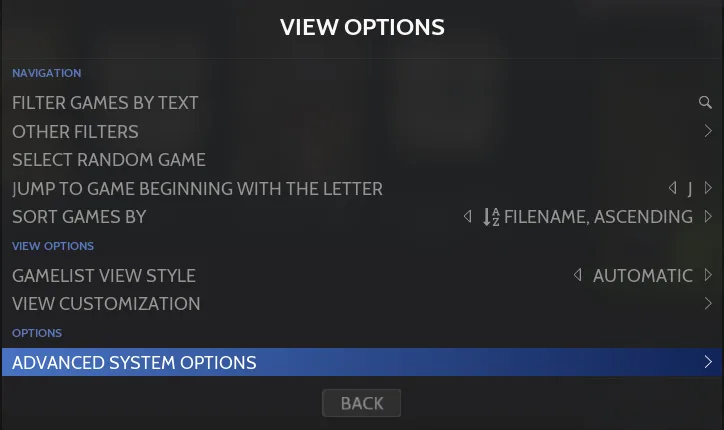
Configure emulator options through RetroBat’s menus without opening the emulator itself. RetroBat calls these options “features” and lets you apply them globally, to a system, or to a single game.
1. Choose the configuration scope
- - All systems and games: open MAIN MENU > GAME SETTINGS.
- - All games in one system: in that system’s Game View, press SELECT, then choose ADVANCED SYSTEM OPTIONS.
- - One game only: in Game View, hold South on the game, then choose ADVANCED GAME OPTIONS. The documentation also provides North in the Game Options menu as an alternative.
The global menu contains only common options, such as shaders, decorations, aspect ratio, integer scaling, and controller autoconfiguration. Emulator-specific options are available at the system and game levels.
2. Select the emulator before adjusting options
In the system or game configuration menu, start with the EMULATOR line and choose the emulator and core to use. Change this selection first: RetroBat reloads the menu to show the options available for that emulator. The list can change when you select a different emulator.
- - GENERAL SETTINGS: common display options, including shaders, decorations, aspect ratio, video mode, integer scaling, and smoothing.
- - ADVANCED SETTINGS: emulator- or core-specific options, organized into submenus.
- - PORT SETTINGS: settings for the selected game when configuring ports.
3. Check which setting takes priority
The most specific setting wins: a game setting overrides the system setting, and the system setting overrides the global setting. If a global change does not govern a particular game, check whether that game or its system has a more specific setting.
Sources & references
Content responsibility: FrameTinker editorial desk. Source authors and software maintainers are credited separately below; this is not a claim of hands-on testing.
Published .
RetroBat: navigation — configuration of systems and games — official gaming software documentation https://raw.githubusercontent.com/RetroBat-Official/retrobat-wiki/master/lang/en/navigation/configuration-of-systems-and-games.mdRetrieved Nov 5, 2026Something doesn’t match your setup?
Suggest a correction