

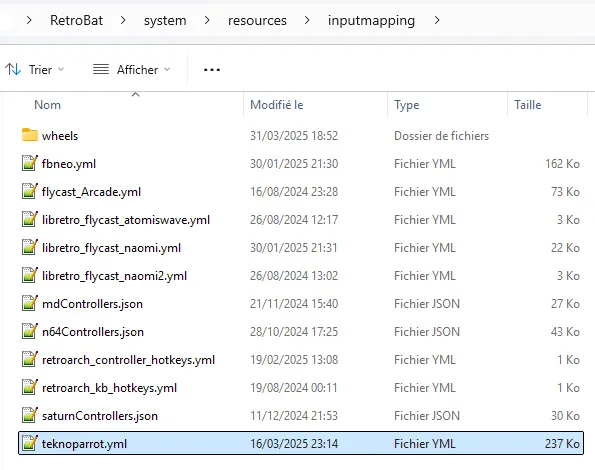
This guide covers RetroBat-managed TeknoParrot controls, not standalone emulator defaults. Since RetroBat V7, RetroBat includes basic mappings for most available TeknoParrot games, excluding Patreon games. Per-game customization is available when the default mapping does not fit your controller or the game’s controls.
1. Locate the mapping file
The supplied configuration is at \system\resources\inputmapping\teknoparrot.yml within the RetroBat installation.
2. Match the entry to the game profile
- 1. Find the game’s corresponding configuration file in \emulators\teknoparrot\GameProfiles\.
- 2. Name the game’s container in the mapping file exactly after that profile filename, but use lowercase and omit the extension.
- 3. For ordinary controller mappings, follow the documented column order: the value from the profile’s <InputMapping> tags, the controller button, then the corresponding in-game action.
3. Choose controller input names
Lightgun mapping differences
For lightgun actions recognized as mouse inputs, the documentation says to reverse the entry order and replace the usual InputMapping value with one of these names: mouseleft, mousemiddle, mouseright, button4, or button5. Do not treat these entries as ordinary controller-button mappings.
For other lightgun buttons identified as keyboard inputs, use kb_x, where x is the keyboard key, or kb_dy, where y is a number on the keyboard.
4. Preserve your custom file
Place the modified teknoparrot.yml in user\inputmapping at the root of the RetroBat folder. The documentation identifies this as the location that prevents the custom file from being overwritten during RetroBat updates.
Sources & references
Content responsibility: FrameTinker editorial desk. Source authors and software maintainers are credited separately below; this is not a claim of hands-on testing.
Published .
RetroBat: controllers — specific mapping — teknoparrot controller mapping — official gaming software documentation https://raw.githubusercontent.com/RetroBat-Official/retrobat-wiki/master/lang/en/controllers/specific_mapping/teknoparrot-controller-mapping.mdRetrieved Nov 4, 2026Something doesn’t match your setup?
Suggest a correction