

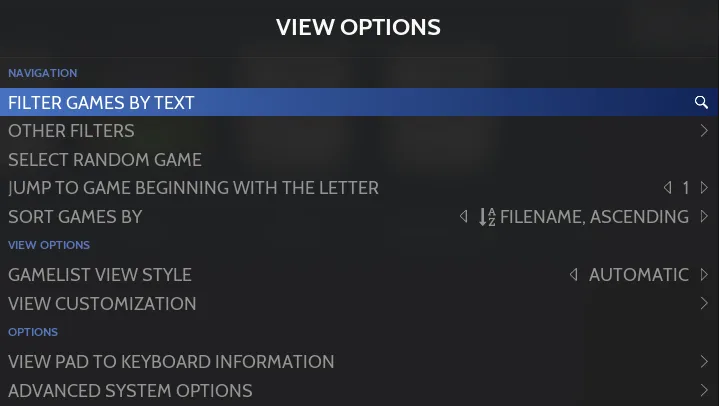
RetroBat’s View Options menu controls the system or collection you are currently browsing. Its settings are not applied globally across every system.
Open the menu
Find and sort games
- - FILTER GAMES BY TEXT: Enter text to show only games whose names contain it.
- - OTHER FILTERS: Narrow the list by criteria such as favorites, genre, player count, played status, region, language, RetroAchievements, missing media, kid games, or lightgun games.
- - SELECT RANDOM GAME: Move to a random game in the list; the documented action is navigation, not launching the game.
- - JUMP TO GAME BEGINNING WITH THE LETTER: Move directly to games starting with a chosen letter.
Use SORT GAMES BY to change the list order. Documented criteria include name, rating, times played, last played, player count, release date, genre, developer, publisher, and game time, with ascending or descending ordering.
Change the game-list display
Choose GAMELIST VIEW STYLE to change the current system’s presentation, such as list, detailed, or grid. AUTOMATIC uses the style defined in the theme configuration. This setting appears only when the theme offers multiple styles; if it is absent, that theme requirement is the documented condition to check.
Open VIEW CUSTOMIZATION for additional display settings for the current system. Its Gamelist style section includes the view style and default grid size, while Theme options contains theme-provided choices such as layout and colors.
Under Gamelist options, you can configure favorites at the top, hidden files, folders, the parent-folder entry, and icons such as region flags or save-state indicators. This section also offers file names instead of game names and FILE EXTENSIONS controls for hiding selected file types in the current system.
Sources & references
Content responsibility: FrameTinker editorial desk. Source authors and software maintainers are credited separately below; this is not a claim of hands-on testing.
Published .
RetroBat: navigation — view options — official gaming software documentation https://raw.githubusercontent.com/RetroBat-Official/retrobat-wiki/master/lang/en/navigation/view-options.mdRetrieved Nov 5, 2026Something doesn’t match your setup?
Suggest a correction