

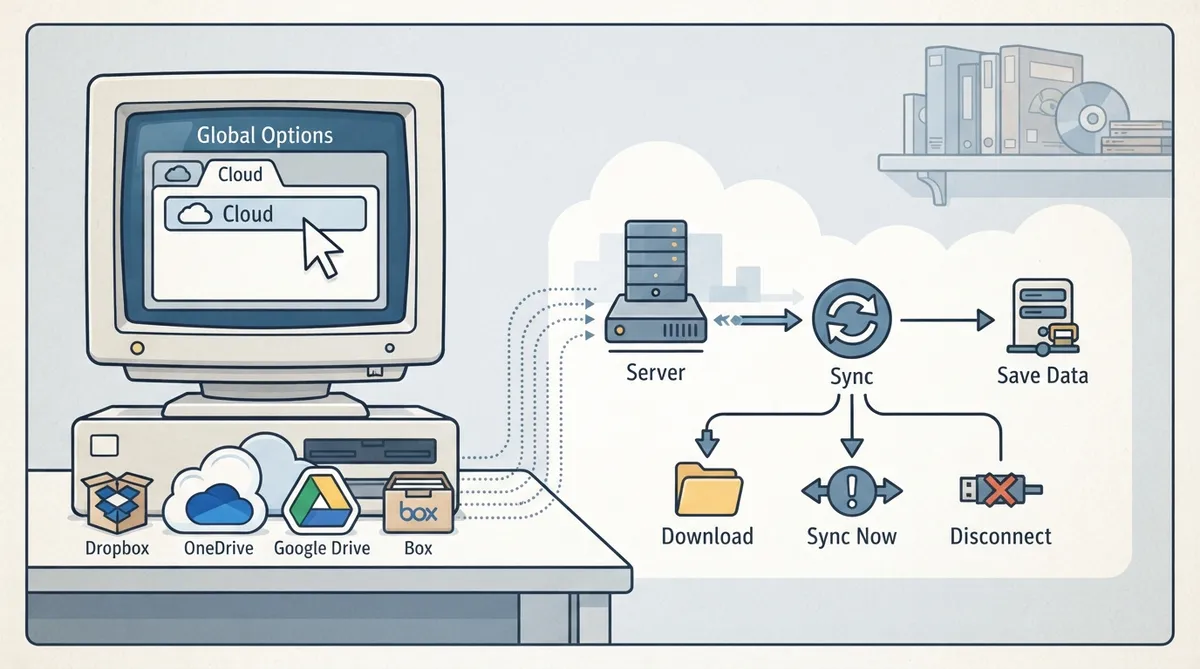
ScummVM's Global Options menu includes a Cloud tab for managing connected cloud storage services. This guide summarizes what the official documentation describes for that tab, including how to reach it and what each listed control is documented to do.
Opening the Cloud tab
- From the ScummVM Launcher, select Global Options. If needed, click the > scroll arrow until the Cloud tab is visible. Select the Cloud tab.
The Cloud tab sits among the Global Options tabs and may be off-screen until you scroll. For a fuller look at using ScummVM's built-in cloud functionality, the official documentation points to its dedicated connect-to-cloud guide.
Supported storage services
The Active storage option lets you choose from Dropbox, OneDrive, Google Drive, or Box.
Documented controls
- Sync Now: manually syncs saved games with the cloud service. Saved games also sync automatically on launch, after saving, and on game load. Download game files: listed among the Cloud tab's options. Disconnect: listed among the Cloud tab's options.
Sync Now is the manual trigger; the automatic behavior described in the documentation means you do not need to press it every time you launch, save or load a game, but it is available when you want to sync on demand.
Reference table · Scroll horizontally to see all columns.
| Item | Documented behavior |
|---|---|
| Location | Global Options > Cloud tab |
| Active storage | Choose from Dropbox, OneDrive, Google Drive, or Box |
| Sync Now | Manually syncs saved games with the cloud service |
| Automatic sync | On launch, after saving, and on game load |
| Download game files | Listed as a Cloud tab option |
| Disconnect | Listed as a Cloud tab option |
| Platform availability | Not supported on all platforms |
Sources & references
Content responsibility: FrameTinker editorial desk. Source authors and software maintainers are credited separately below; this is not a claim of hands-on testing.
Published .
ScummVM: cloud — official gaming software documentation https://raw.githubusercontent.com/scummvm/scummvm/master/doc/docportal/settings/cloud.rstRetrieved Oct 19, 2026Something doesn’t match your setup?
Suggest a correction