

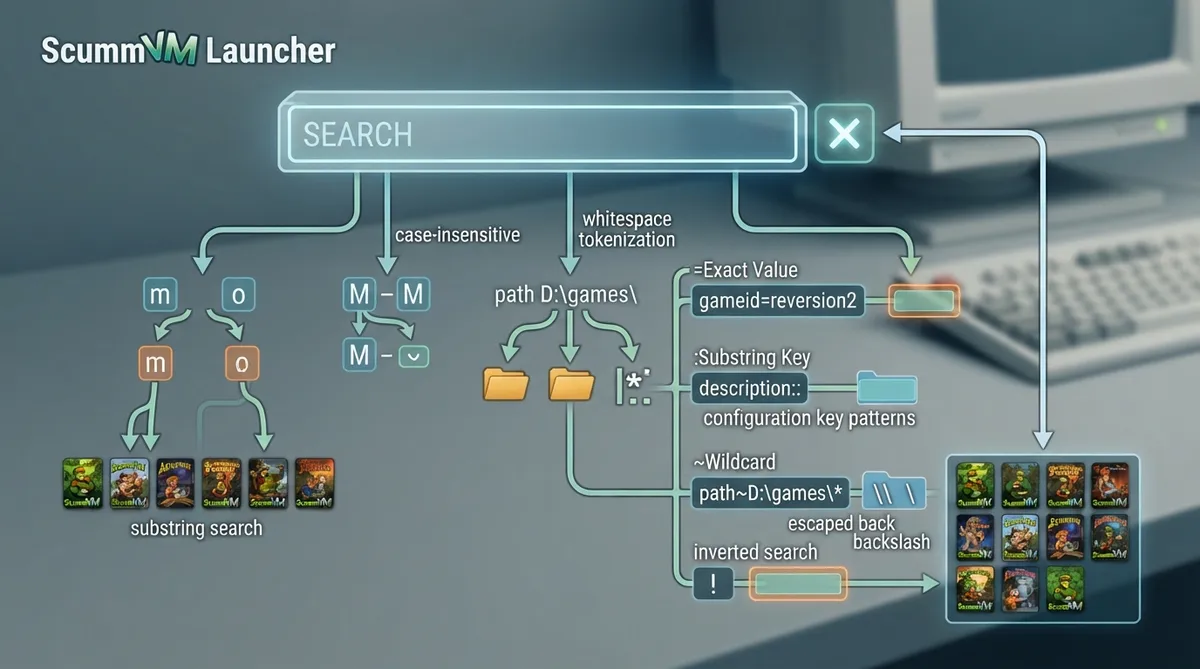
The ScummVM Launcher search box filters the list of added games. This guide summarizes the official documentation page that expands on the Launcher interface description, covering basic filtering, substring matching, configuration key patterns, abbreviations and inverted searches. It is a source summary of the documentation, not a hands-on tested walkthrough.
Basic filtering behavior
- A filter is applied as you type, so you do not need to press Enter or click anything to perform the search.
- All searches are case insensitive.
- To reset the filter and get the full list of games, click the cross icon next to the text input field.
- Whitespace breaks the search input into separate tokens or search patterns.
Substring search
The simplest way to search is to use the substring search functionality. For example, type m to get all the games containing an 'M' or 'm' in their description, and type monkey to get games like "The Curse of Monkey Island (Demo/Windows)", "Infinite Monkeys" or "Three Monkeys, One Cage". The documentation notes that the search pattern should not contain the characters :, = or ~, and should not start with the ! character, if you want a plain substring search.
Searching configuration keys
To search for game properties listed in the configuration file, three patterns are available.
- <key>=<value> checks the exact value of <key>. Example: gameid=reversion2 returns games with the exact gameid "reversion2".
- <key>:<value> searches for a substring at <key>. Example: description:: returns games with a ":" substring in the description.
- <key>~<value> matches a wildcard against <key>. Example: path~D:\games\* returns games located in the Windows folder D:\Games\.
Key abbreviations
The documentation states that the six most common configuration keys can be abbreviated by typing any prefix instead of the full key name. The page does not list all six keys in the collected excerpt, so the exact abbreviations should be confirmed in the linked configuration file documentation.
Inverting a search
To invert the search result, prefix the search pattern with the ! character. This returns the games that do not match the pattern.
Reference table · Scroll horizontally to see all columns.
| Pattern | Behavior | Documented example |
|---|---|---|
| <key>=<value> | Exact value match for the key | gameid=reversion2 |
| <key>:<value> | Substring match at the key | description:: |
| <key>~<value> | Wildcard match against the key | path~D:\games\* |
Sources & references
Content responsibility: FrameTinker editorial desk. Source authors and software maintainers are credited separately below; this is not a claim of hands-on testing.
Published .
ScummVM: understand search box — official gaming software documentation https://raw.githubusercontent.com/scummvm/scummvm/master/doc/docportal/advanced_topics/understand_search_box.rstRetrieved Oct 19, 2026Something doesn’t match your setup?
Suggest a correction