

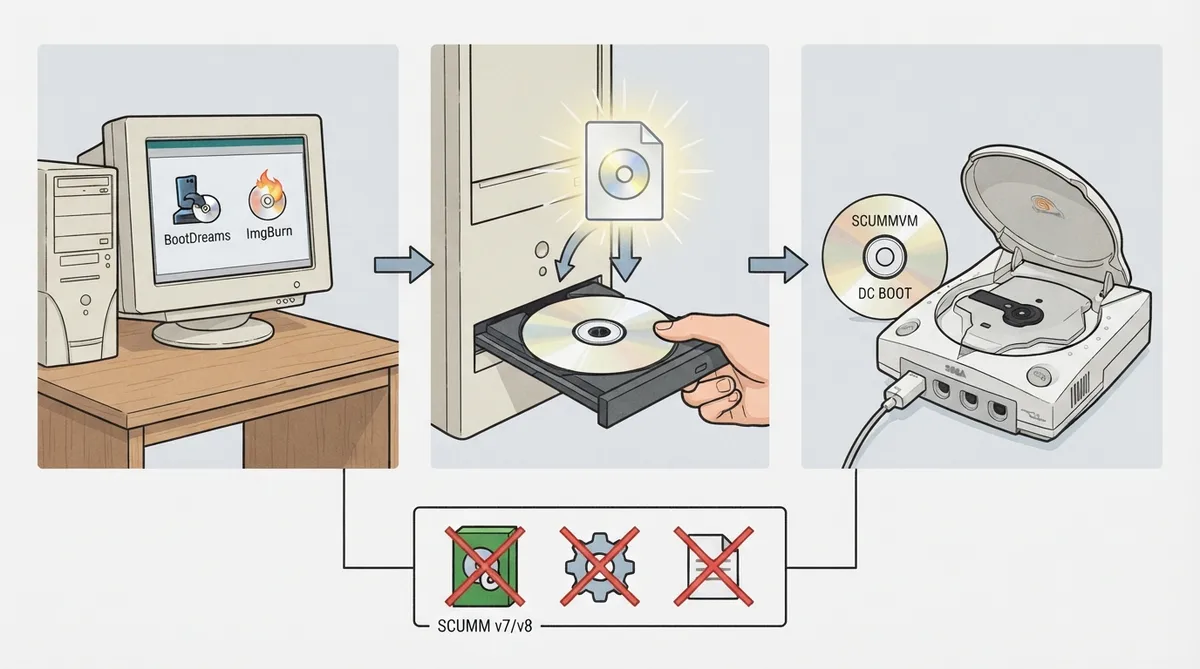
ScummVM's official documentation includes a dedicated page for running the emulator on the Sega Dreamcast. It outlines the hardware and software needed, describes how to build a bootable disc image, and sets out the port's documented limitations. This article summarizes that page for readers planning a Dreamcast build; the instructions are drawn from documentation and have not been hands-on tested here.
What you'll need
- The documentation lists these requirements:
- - A CD-R disc (80-minute / 700 MB)
- - A CD-RW drive
- - A computer running Windows
- - Software to create a bootable disc image, such as BootDreams
- - CD burning software such as Nero Burning ROM, ImgBurn or Alcohol120%
Building and burning the disc
- Per the documentation, the workflow runs on a Windows PC:
- 1. Use bootable disc image software such as BootDreams to create a bootable image for the Dreamcast.
- 2. Burn the resulting image to an 80-minute / 700 MB CD-R using a CD-RW drive and burning software such as Nero Burning ROM, ImgBurn or Alcohol120%.
Known limitations of the Dreamcast port
- The documentation describes the following constraints:
- - The Dreamcast has no external storage medium and only 16 MB of RAM, so the port does not support SCUMM v7/v8 games (The Dig, Full Throttle, The Curse of Monkey Island), and other large games may not run at all.
- - There is no way to manually add games to the games list; autodetection usually works, but games may appear twice, an incorrect game may appear alongside the correct one, or, rarely, a game may not appear at all.
- - ScummVM for the Dreamcast does not use a configuration file.
- - There is no way to change ScummVM settings on the Dreamcast.
Because settings cannot be changed on the console and the configuration file is not used, the disc build itself is the main point of control. The documented RAM and storage limits also mean large games should be treated as unsupported or likely to fail rather than assumed to work.
Reference table · Scroll horizontally to see all columns.
| Feature or item | Documented status |
|---|---|
| SCUMM v7/v8 games (The Dig, Full Throttle, The Curse of Monkey Island) | Not supported |
| Other large games | May not run at all |
| Manual addition of games to the list | Not available; relies on autodetection |
| Configuration file | Not used |
| Changing ScummVM settings on the console | Not possible |
| CD-R disc | 80 min / 700 MB |
| Bootable image tool (example) | BootDreams |
| Burning software (examples) | Nero Burning ROM, ImgBurn, Alcohol120% |
Sources & references
Content responsibility: FrameTinker editorial desk. Source authors and software maintainers are credited separately below; this is not a claim of hands-on testing.
Published .
ScummVM: sega dreamcast — official gaming software documentation https://raw.githubusercontent.com/scummvm/scummvm/master/doc/docportal/other_platforms/sega_dreamcast.rstRetrieved Oct 27, 2026Something doesn’t match your setup?
Suggest a correction